
Identity leverages Secure Score with twenty-seven recommended actions. In a series of blog posts, I will go through all twenty-seven recommended actions and what they mean, a plan of approach, their impact, and my security recommendations, hopefully helping others. The twenty-third one in the series is the “GPO can be modified by unprivileged accounts” recommended action.
Introduction
You have twenty-seven recommendations if you filter the Secure Score recommended actions for Microsoft Defender for Identity.
- Resolve unsecure domain configurations
- Resolve unsecure account attributes
- Remove dormant accounts from sensitive groups
- Protect and manage local admin passwords with Microsoft LAPS
- Configure VPN integration
- Reduce lateral movement path risk to sensitive entities
- Stop clear text credentials exposure
- Disable Print spooler service on domain controllers
- Stop weak cipher usage
- Remove unsecure SID history attributes from entities
- Modify unsecure Kerberos delegations to prevent impersonation
- Install Defender for Identity Sensor on all Domain Controllers
- Set a honeytoken account
- Start your Defender for Identity deployment, installing Sensors on DC’s and other eligible servers
- Accounts with non-default Primary Group ID
- Change Domain Controller computer account old password
- Reversible passwords found in GPOs
- Unsafe permissions on the DnsAdmins group
- GPO assigns unprivileged identities to local groups with elevated privileges
- Remove access rights on suspicious accounts with the Admin SDHolder permission
- Remove local admins on identity assets
- Remove non-admin accounts with DCSync permissions
- GPO can be modified by unprivileged accounts
- Built-in Active Directory Guest account is enabled
- Change password for krbtgt account
- Change password of built-in domain Administrator account
- Ensure that all privileged accounts have the configuration flag
Some recommended actions are easy to configure, but others require time, proper planning, auditing, and expertise. This blog post will review the recommended action of “GPO can be modified by unprivileged accounts.”
Update: Microsoft keeps updating the recommended actions list. I will do my best to keep the list up-to-date.
Group Policy Object
A Group Policy Object (GPO) is a collection of settings in a Windows environment used to manage and control the working environment of user accounts and computer accounts within Active Directory. GPOs allow system administrators to centrally enforce rules such as password policies, software installation, desktop restrictions, and security settings. GPOs are linked to containers in Active Directory, such as sites, domains, or organizational units (OUs), and are automatically applied when a user logs in or a computer starts up. This ensures consistency, improves security, and reduces the need for manual configuration across multiple systems.
GPOs are stored in two locations: in Active Directory as GPO objects and in the SYSVOL folder on domain controllers as a collection of files and folders. Each GPO has a unique GUID and consists of Group Policy settings that control various aspects of the domain environment. The power and centralized nature of GPOs make them an attractive target for attackers. Compromising a GPO can allow threat actors to deploy malicious software, change security configurations, or gain persistent access across multiple systems simultaneously.
Unprivileged Account
An unprivileged account, also referred to as a standard user account or non-administrative account, is a user account that does not have elevated permissions within an Active Directory environment. These accounts operate under the principle of least privilege, meaning they have only the minimum permissions necessary to perform their designated tasks, typically limited to accessing their own files, running approved applications, and making minor system changes that do not affect the overall system configuration or other users.
In contrast to privileged accounts, which include domain administrators, enterprise administrators, or accounts with delegated administrative rights, unprivileged accounts cannot install software, modify system settings, access sensitive resources, or make changes that affect the domain infrastructure. Unprivileged accounts include regular domain users, standard employee accounts, and service accounts without elevated permissions. In a well-secured environment, the majority of accounts should be unprivileged, with administrative access granted only when necessary and ideally through time-limited elevation methods like Privileged Access Workstations (PAWs) or Just-In-Time (JIT) access solutions.
Assessment
Microsoft Defender for Identity identifies Group Policy Objects in the environment that can be modified by unprivileged accounts. This security assessment highlights a critical vulnerability where standard users have permissions to edit GPOs, which could potentially lead to the compromise of the entire domain. When unprivileged accounts have write access to GPO objects in Active Directory or the corresponding files in the SYSVOL share, they can modify policy settings that affect numerous computers and users across the domain.
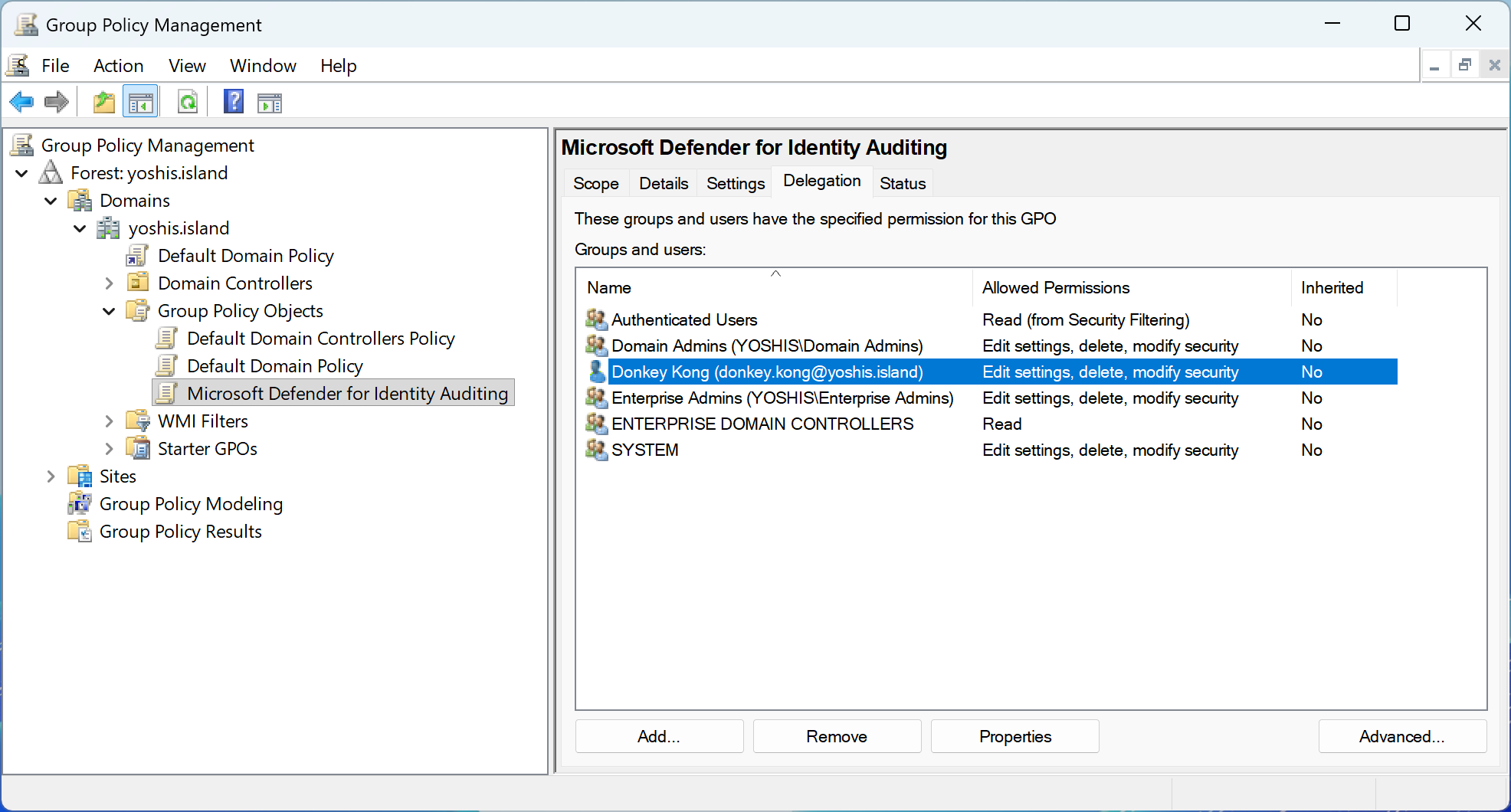
This misconfiguration represents a significant security risk because GPOs are automatically applied to all systems within their scope. An attacker who compromises a standard user account with GPO modification rights could inject malicious settings, deploy ransomware, create backdoor accounts, disable security controls, or escalate privileges across the entire environment. The recommended action in Microsoft Secure Score helps organizations identify these dangerous permission assignments before they can be exploited.
Risk
Attackers actively seek opportunities to manipulate Group Policy settings to advance their objectives within a target network. When unprivileged accounts have modification rights to GPOs, threat actors can exploit this weakness to gather intelligence about the domain’s security posture, identify exploitable vulnerabilities, and plan sophisticated multi-stage attacks.
By obtaining information on Group Policy settings, attackers can map out the security measures in place, understand password policies, identify systems with weak configurations, and discover patterns in how domain objects are managed. This reconnaissance phase is critical for adversaries as it allows them to identify potential paths for privilege escalation, understand where valuable assets reside, and determine how to move laterally through the network without triggering security alerts.
Furthermore, the ability to modify GPOs grants attackers an extremely powerful capability to distribute malicious payloads or configuration changes across multiple systems simultaneously. A compromised GPO can be used to deploy malware to hundreds or thousands of domain-joined computers, disable antivirus software, create persistent backdoor accounts, modify firewall rules, or establish scheduled tasks that execute malicious code. This level of access effectively transforms a single compromised standard user account into a domain-wide threat vector.
Beyond malicious intent, there are also operational risks. Legitimate users, services, or applications that rely on stable GPO configurations may stop functioning if permissions are accidentally modified or if unauthorized changes are made by accounts that should not have such access. This can lead to widespread service disruptions and complicate troubleshooting efforts.
Identifying Affected GPOs
Microsoft Defender for Identity automatically identifies Group Policy Objects in your environment that can be modified by unprivileged accounts. This detection capability continuously monitors GPO permissions across both Active Directory objects and SYSVOL file system permissions to identify misconfigurations that could lead to domain compromise.
When Microsoft Defender for Identity detects GPOs with weak permissions, it surfaces this finding through the security assessment “GPO can be modified by unprivileged accounts” in Microsoft Secure Score. The assessment provides details about which GPOs are affected and which unprivileged accounts or groups have modification rights. This automated detection saves administrators significant time compared to manual auditing and ensures continuous visibility into this critical security risk.
Administrators can access this information through the Microsoft Defender portal by navigating to Secure Score, filtering for Microsoft Defender for Identity recommendations, and selecting the “GPO can be modified by unprivileged accounts” assessment. The detailed view shows each affected GPO, the accounts with excessive permissions, and the potential impact of the misconfiguration.
Remediation Steps
Once Microsoft Defender for Identity has identified Group Policy Objects that can be modified by unprivileged accounts, it is crucial to take immediate action to remove these dangerous permissions. Carefully review each assigned permission identified in the security assessment, evaluate whether the permission is necessary for legitimate business operations, and remove any unnecessary or excessive user rights.
The remediation process should follow these steps. First, review the findings in Microsoft Defender for Identity’s security assessment, documenting all affected GPOs, the unprivileged accounts or groups with modify permissions, and the source of the permission, whether it was granted through Group Policy management permissions, Active Directory object permissions, or SYSVOL file system permissions. Second, coordinate with the business owners or application teams to understand if any of these permissions were intentionally granted for a specific purpose, such as delegated GPO management for a particular organizational unit.
For permissions that are not justified by a legitimate business need, remove them using the appropriate method. For GPO management permissions, use the Group Policy Management Console or the Set-GPPermissions PowerShell cmdlet to revoke Edit or FullControl rights from unprivileged accounts. For Active Directory object permissions, use Active Directory Users and Computers with Advanced Features enabled, or use PowerShell with the Set-Acl cmdlet to modify the nTSecurityDescriptor attribute. For SYSVOL file system permissions, connect to the SYSVOL share on a domain controller and use the Security tab in the folder properties to remove write permissions from unprivileged accounts.
In some cases, organizations may have intentionally delegated GPO management to specific teams or individuals. If this is a requirement, consider implementing a more secure approach such as creating a dedicated administrative group for GPO management, adding only the necessary accounts to this group, and granting permissions to the group rather than individual accounts. Additionally, implement monitoring and alerting for any changes to GPO permissions or GPO contents to detect unauthorized modifications quickly.
After remediation, verify that Microsoft Defender for Identity no longer flags these GPOs in the security assessment. The recommendation should automatically update to reflect the improved security posture once the dangerous permissions have been removed. Establish a regular review process to monitor this security assessment on a periodic basis, such as quarterly, to prevent permission creep and ensure that only authorized accounts maintain the ability to modify Group Policy Objects.
Conclusion
Group Policy Objects are one of the most powerful tools in an Active Directory environment, providing centralized control over user and computer configurations across the entire domain. However, this same power makes GPOs an attractive target for attackers seeking to establish persistence, escalate privileges, or deploy malicious payloads across multiple systems simultaneously.
When unprivileged accounts have permissions to modify GPOs, whether through Group Policy management permissions, Active Directory object permissions, or SYSVOL file system permissions, the security of the entire domain is at risk. A compromised standard user account with GPO modification rights can be leveraged to compromise hundreds or thousands of systems, disable security controls, create backdoor accounts, or exfiltrate sensitive data.
Microsoft Defender for Identity’s security assessment for “GPO can be modified by unprivileged accounts” helps organizations identify and remediate this critical vulnerability before it can be exploited. By continuously monitoring GPO permissions and automatically detecting dangerous permission assignments, Microsoft Defender for Identity provides the visibility needed to maintain a secure Active Directory environment.
Implementing the principle of least privilege for GPO management is essential for maintaining a secure Active Directory environment. Regularly reviewing the Microsoft Defender for Identity security assessments, restricting modification rights to only authorized administrative accounts, and monitoring for unauthorized changes are key steps toward preventing GPO-based attacks and ensuring the integrity of the domain infrastructure.
 Microsoft Security Blog