
[WARNING] This blog post is created when Microsoft Windows still came in a physical box with multiple installation disks.
Microsoft Secure Score helps organizations get insights into security posture based on security-related measurements. Microsoft Defender for Identity leverages Secure Score with twenty-seven recommended actions. In a series of blog posts, I will go through all twenty-seven recommended actions of what it means, a plan of approach, their impact, and my security recommendations, hopefully helping others. The second one in the series is the “Resolve unsecure account attributes” recommended action.
Introduction
You have twenty-seven recommendations if you filter the Secure Score recommended actions for Microsoft Defender for Identity.
- Resolve unsecure domain configurations
- Resolve unsecure account attributes
- Remove dormant accounts from sensitive groups
- Protect and manage local admin passwords with Microsoft LAPS
- Configure VPN integration
- Reduce lateral movement path risk to sensitive entities
- Stop clear text credentials exposure
- Disable Print spooler service on domain controllers
- Stop weak cipher usage
- Remove unsecure SID history attributes from entities
- Modify unsecure Kerberos delegations to prevent impersonation
- Install Defender for Identity Sensor on all Domain Controllers
- Set a honeytoken account
- Start your Defender for Identity deployment, installing Sensors on DC’s and other eligible servers
- Accounts with non-default Primary Group ID
- Change Domain Controller computer account old password
- Reversible passwords found in GPOs
- Unsafe permissions on the DnsAdmins group
- GPO assigns unprivileged identities to local groups with elevated privileges
- Remove access rights on suspicious accounts with the Admin SDHolder permission
- Remove local admins on identity assets
- Remove non-admin accounts with DCSync permissions
- GPO can be modified by unprivileged accounts
- Built-in Active Directory Guest account is enabled
- Change password for krbtgt account
- Change password of built-in domain Administrator account
- Ensure that all privileged accounts have the configuration flag
Some recommended actions are easy to configure, but others require time, proper planning, auditing, and expertise. This blog post will review the recommended action of “Resolve unsecure account attributes.”
Update: Microsoft keeps updating the recommended actions list. I will do my best to keep the list up-to-date.
Resolve unsecure account attributes
This remediation is a set of attributes on an account that makes it a potential risk. Here are the account recommendations.
- Remove Do not require Kerberos preauthentication
- Remove Store password using reversible encryption
- Remove Password not required
- Remove Password stored with weak encryption
- Enable Kerberos AES encryption support
- Remove Use Kerberos DES encryption types for this account
Remove Do not require Kerberos preauthentication
Kerberos pre-authentication encrypts the timestamp of the time when requesting a Kerberos ticket. The encryption takes place using the hash of the password of the user object. When a user logs in to the domain, the user enters a password. The password entered by the user also exists in Active Directory. If the hash of the password that the user entered and the hash of the password matches in Active Directory, Active Directory knows that the user entered the correct password. The matching of the hash is called “pre-authentication.” Suppose an account has the option set that pre-authentication is not required. In that case, anyone who can talk to the Domain Controller can request a ticket for the account and impersonate that user since authentication is not required. So, when a malicious actor finds an account with pre-authentication disabled, the malicious actor can authenticate to the domain without even knowing any password. This attack is known as the AS-REP attack.
A long time ago, some network appliances or applications could not handle the pre-authentication part. For that, there is an option to turn off pre-authentication. It is not easy to check if an account authenticates without pre-authentication, but since it is not the default, I presume it does need pre-authentication to be disabled. Since it is a considerable security risk, I recommend checking which application uses the account and seeing if pre-authentication can be enabled or deprecate the appliance or application, looking at the security risks.
To check which accounts have pre-authentication disabled, use the following PowerShell command.
Get-ADUSer -Filter 'DoesNotRequirePreAuth -eq $true'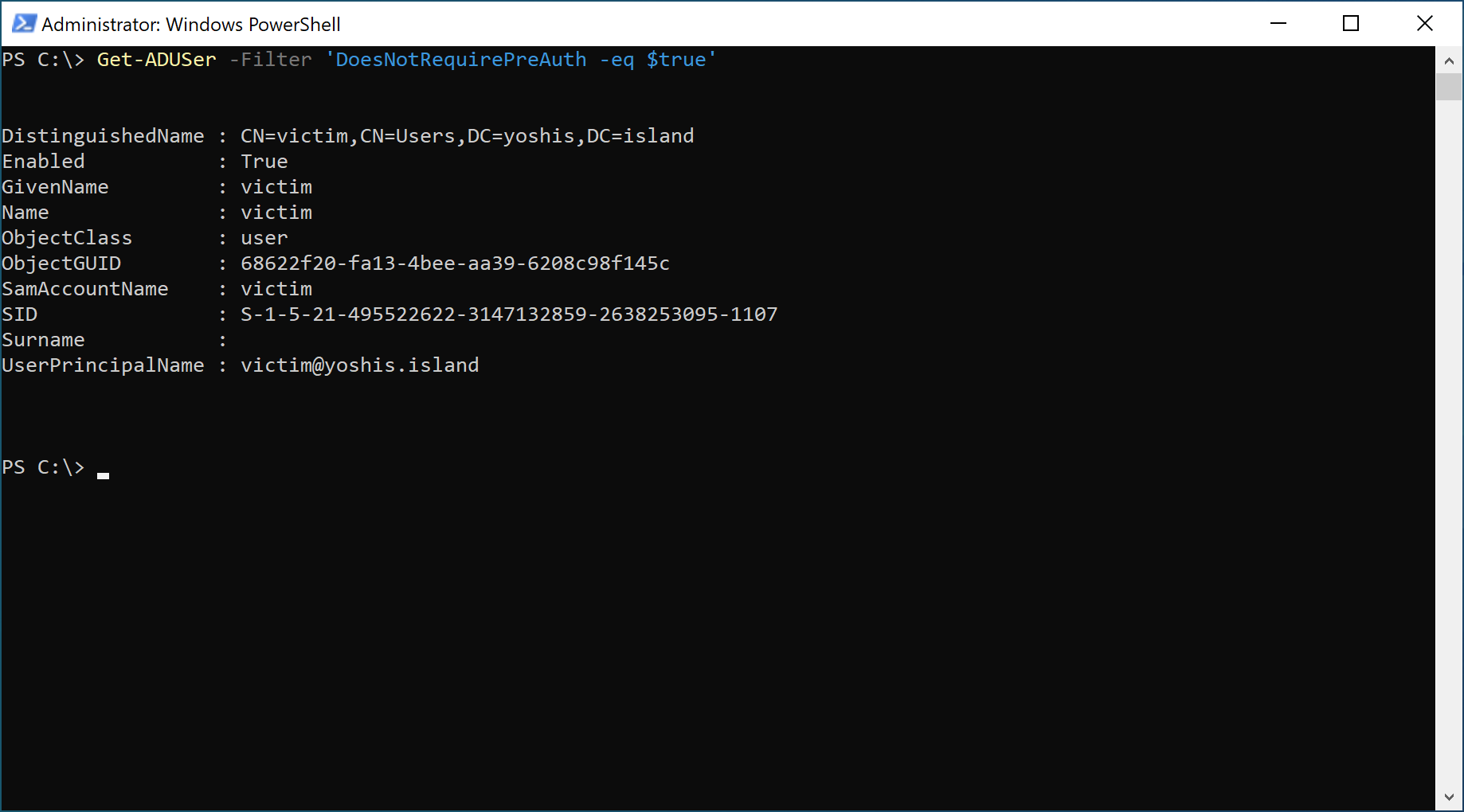
You can enable pre-authentication by removing the “Do not require Kerberos preauthentication” checkbox within Active Directory.

Remove Store password using reversible encryption
Storing passwords using reversible encryption provide applications that need to plain-text password of a user account to authenticate. Since the password is reversible, anyone with the correct permissions can decrypt the password, including a malicious actor. Since the password is stored in reversible encryption in Active Directory, performing a DCSync attack using Mimikatz is one way to get the plain-text password of a user account.
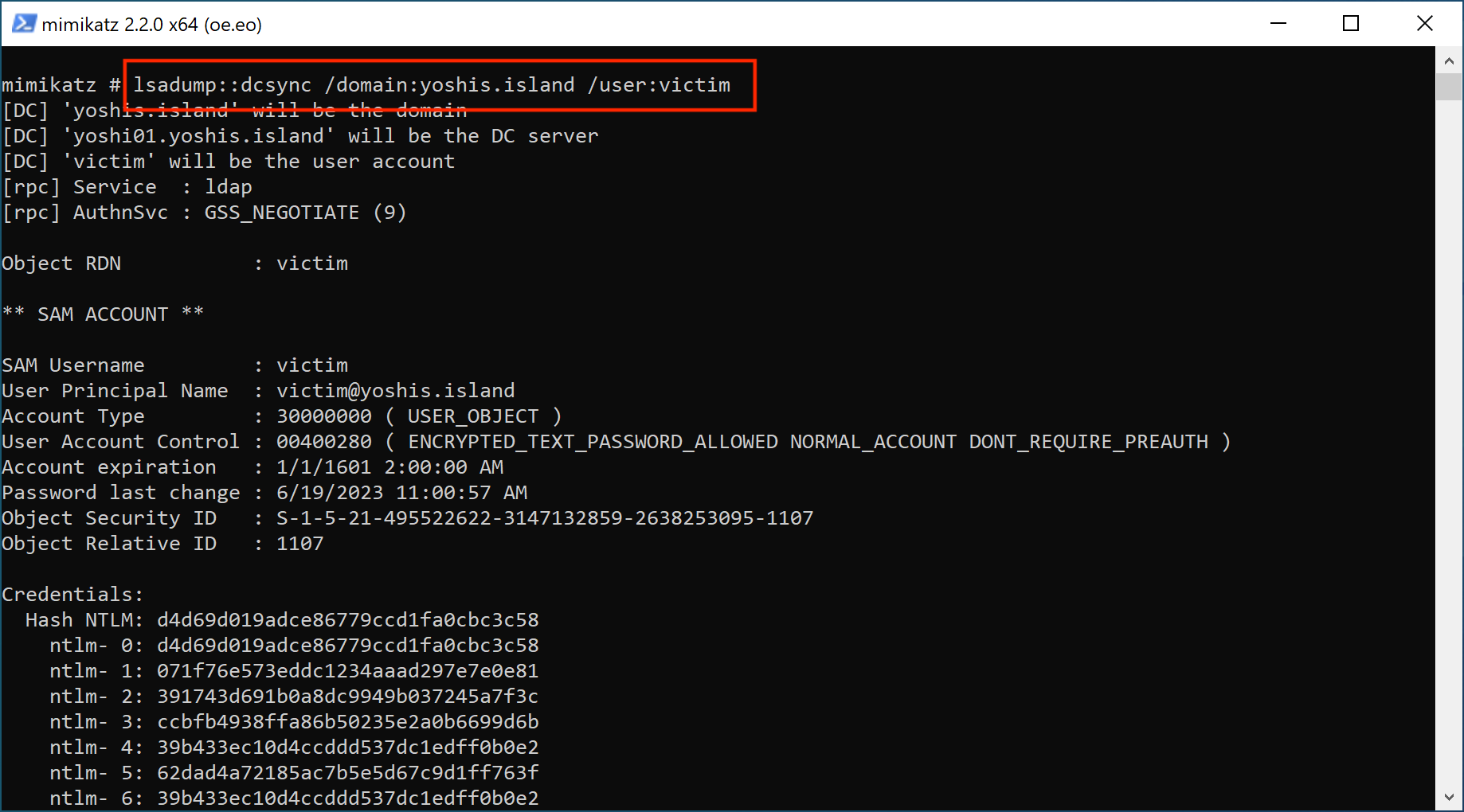
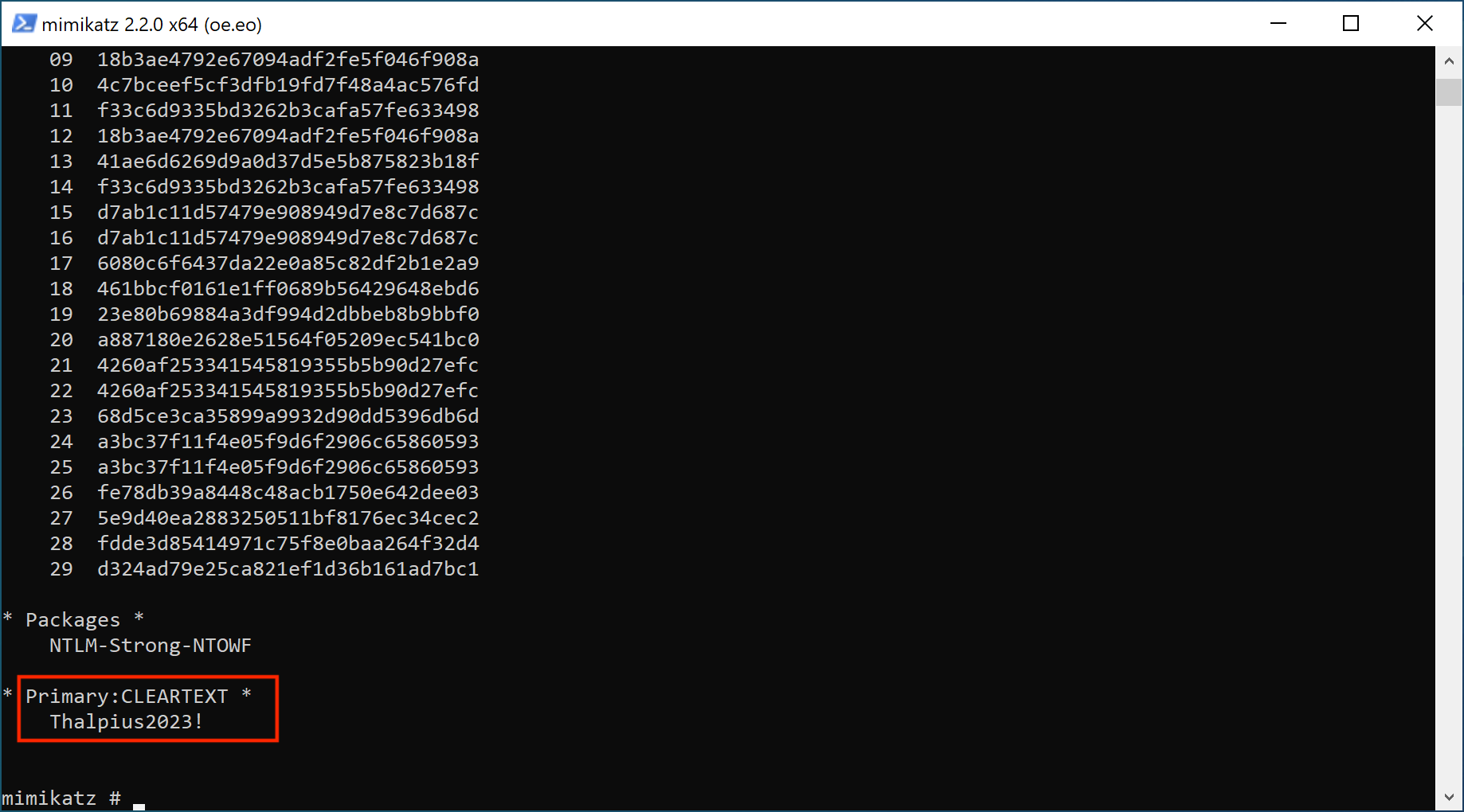
There are multiple ways to allow reversible password encryption, but the two common ones are.
- Per user account in Active Directory Users and Computers.
- For all users in the domain using a group policy.
You can use this PowerShell command to search for accounts that store their passwords using reversible encryption in Active Directory Users and Computers.
Get-ADUser -filter {AllowReversiblePasswordEncryption -eq $True} -Properties "AllowReversiblePasswordEncryption"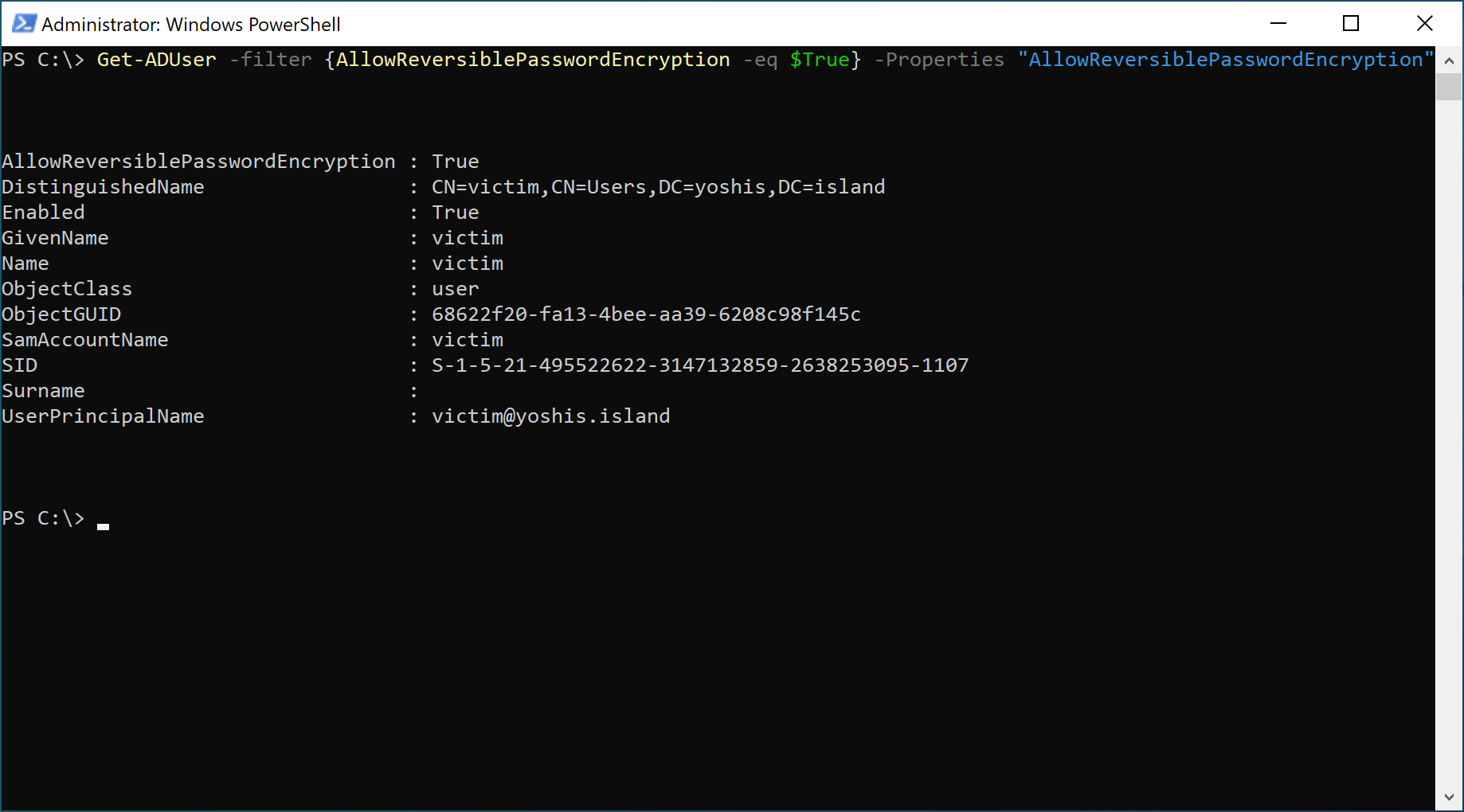
The other option to set allow reversible password encryption for all accounts is a group policy.
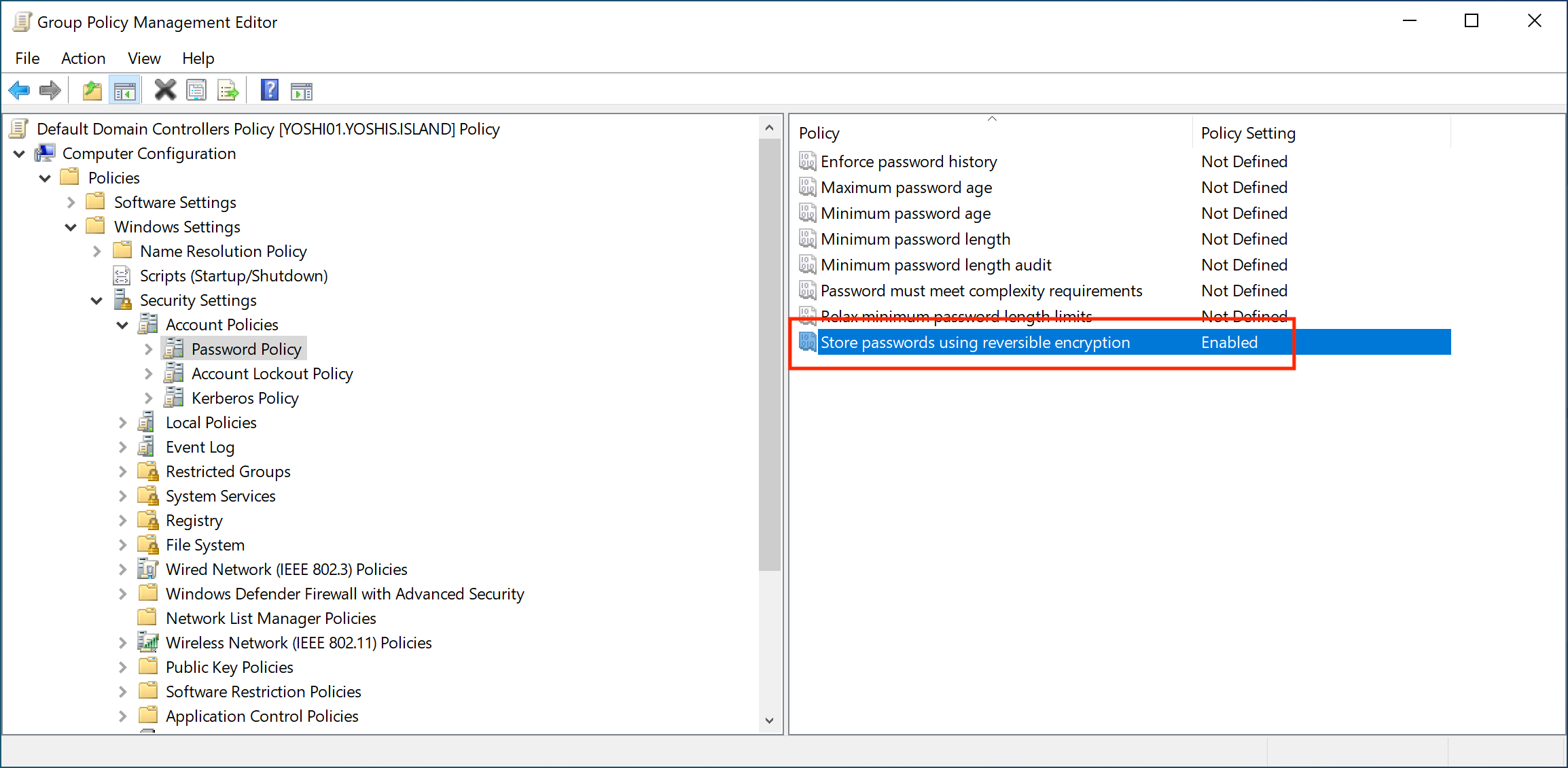
Note: If you use the Challenge Handshake Authentication Protocol (CHAP) through remote access or Internet Authentication Services (IAS), or Digest Authentication in Internet Information Services (IIS), you must keep this group policy enabled.
Since it is a considerable security risk, I recommend checking which application uses the account with the password stored in reversible encryption and either unchecking the checkbox or deprecating the application.

If there is no CHAP, IAS, or Digest Authentication in IIS in the environment and the policy is enabled, disable the group policy.
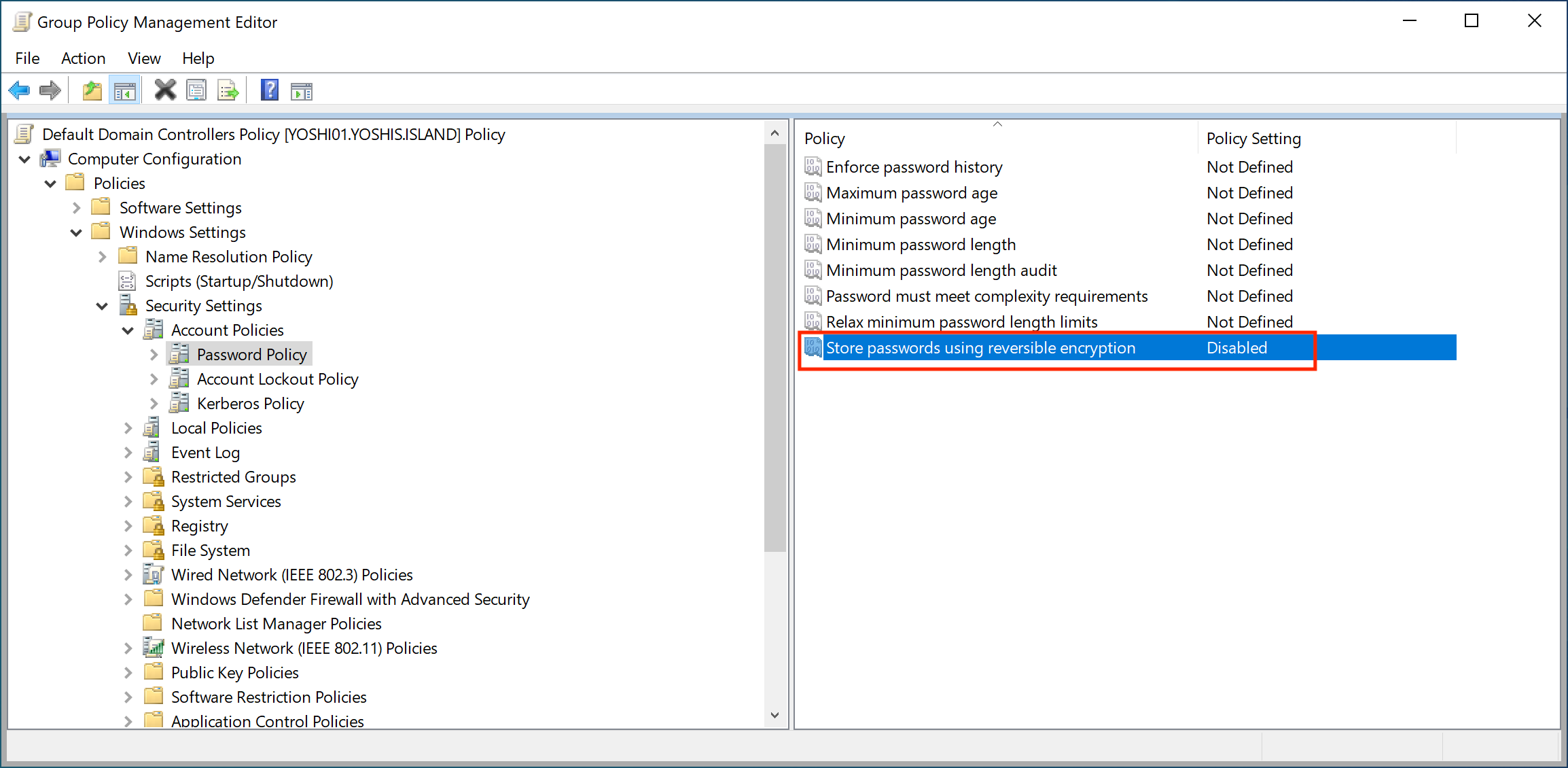
Remove Password not required
According to Microsoft, identity management systems can create accounts that do not require a password and set the flag PASSWD_NOTREQD in the userAccountControl attribute. Setting the flag can also be done manually, but I would like to know if there is a valid reason to have an account without a password in Active Directory. You can use this PowerShell command to search for accounts without a password.
Get-ADUser -Filter {PasswordNotRequired -eq $true}You can use the following command to remove the password not required option.
net user ACCOUNT /passwordreq:yes
Remove Password stored with weak encryption
The recommendation from Microsoft for passwords stored with weak encryption is to reset the password. I wonder why this would store the password in a better encryption type. Microsoft only provides the following text.
“Changing the account’s password enables stronger encryption algorithms to be used for its protection.“
At first, this recommendation did not make any sense. Microsoft states, “Remove Password stored with weak encryption,” and “Changing the account’s password enables stronger encryption algorithms to be used for its protection.” Still, I had no idea what they were talking about, so I contacted the program team at Microsoft.
With “weak encryption,” Microsoft seems to mean the LM hash. Starting with Windows Server 2008, Microsoft disabled the LM hash by default. So, when using an older OS before Windows Server 2008, you must change the passwords hashed in Active Directory to NTLM hashes and not the weak LM hashes. Another scenario is when you migrated the Domain Controllers to a newer OS, but passwords are still stored using the weak LM hashes.
When you migrated the Domain Controllers to Windows Server 2008 or newer, simply changing the password would be sufficient to store the password using the NTM hashing algorithm.
When still using an older OS before Windows Server 2008, I recommend migrating the Domain Controllers to a newer one since there is no extended support for Windows Server 2008.
Important: I want to thank the program team at Microsoft for their tremendous support 🙏🏻
Enable Kerberos AES encryption support
Enabling Kerberos AES encryption support is an interesting recommendation. Active Directory supports multiple encryption types, including DES, RC4, and AES. Microsoft disabled DES encrypted with the release of Windows Server 2008 R2. RC4 is still supported, though, due to backward compatibility. So, yes, AES is a much better encryption type, but since RC4 is still enabled, you can set the AES encryption option for an account, but a malicious actor can still request a Kerberos ticket using RC4 encryption. Disabling RC4 encryption is the most effective, but that is a different project since the impact is enormous.
To enable AES support for a particular account, you can use Active Directory Users and Computers to allow AES encryption.
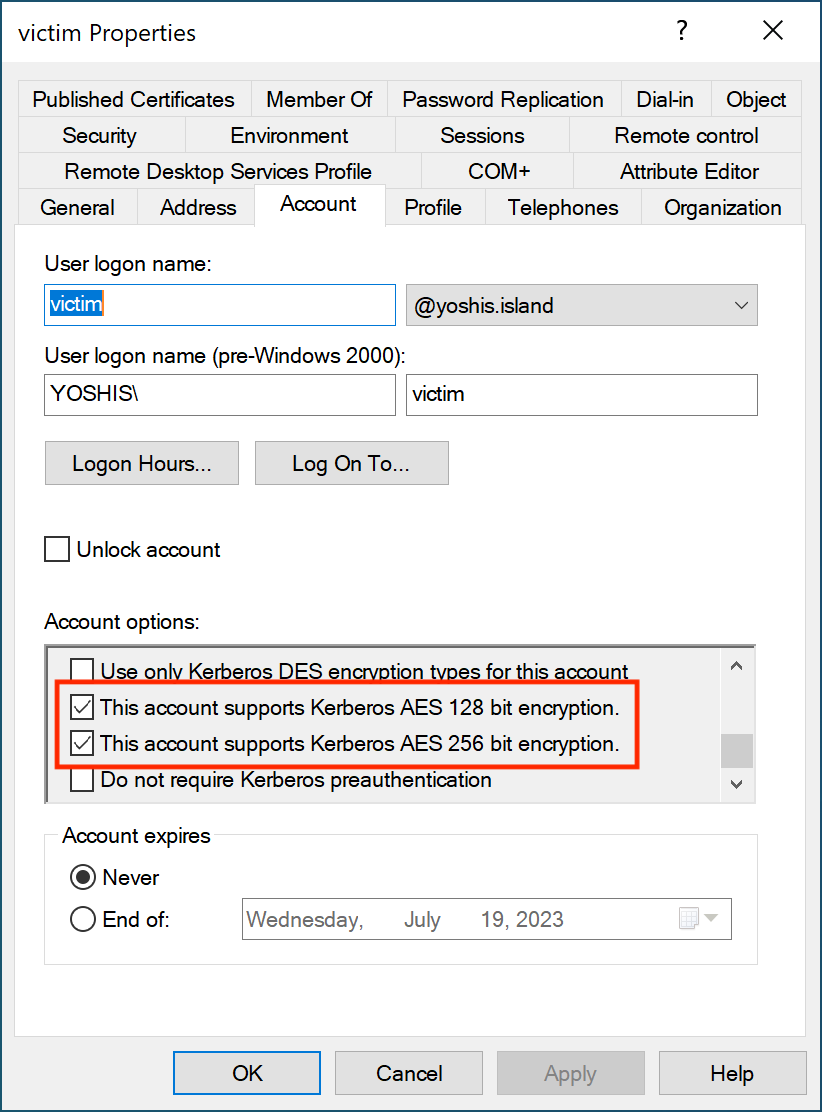
Remember: This does not prevent a malicious actor from requesting a Kerberos ticket with RC4 encryption.
Remove Use Kerberos DES encryption types for this account
Data Encryption Standard, abbreviated DES, is an old encryption type considered not secure. Microsoft has already disabled DES encryption with the Windows Server 2008 R2 release. It is unlikely that any account still needs to support DES encryption.
To search for accounts with DES encryption support, use this PowerShell command.
Get-ADUser -Filter 'UserAccountControl -band 0x200000'You can use this PowerShell command to disable DES encryption for all accounts.
Get-ADUser -Filter 'UserAccountControl -band 0x200000' |
foreach {Set-ADAccountControl -Identity $_ -UseDESKeyOnly $false}
Or, for a single account, you use Active Directory Users and Computers.
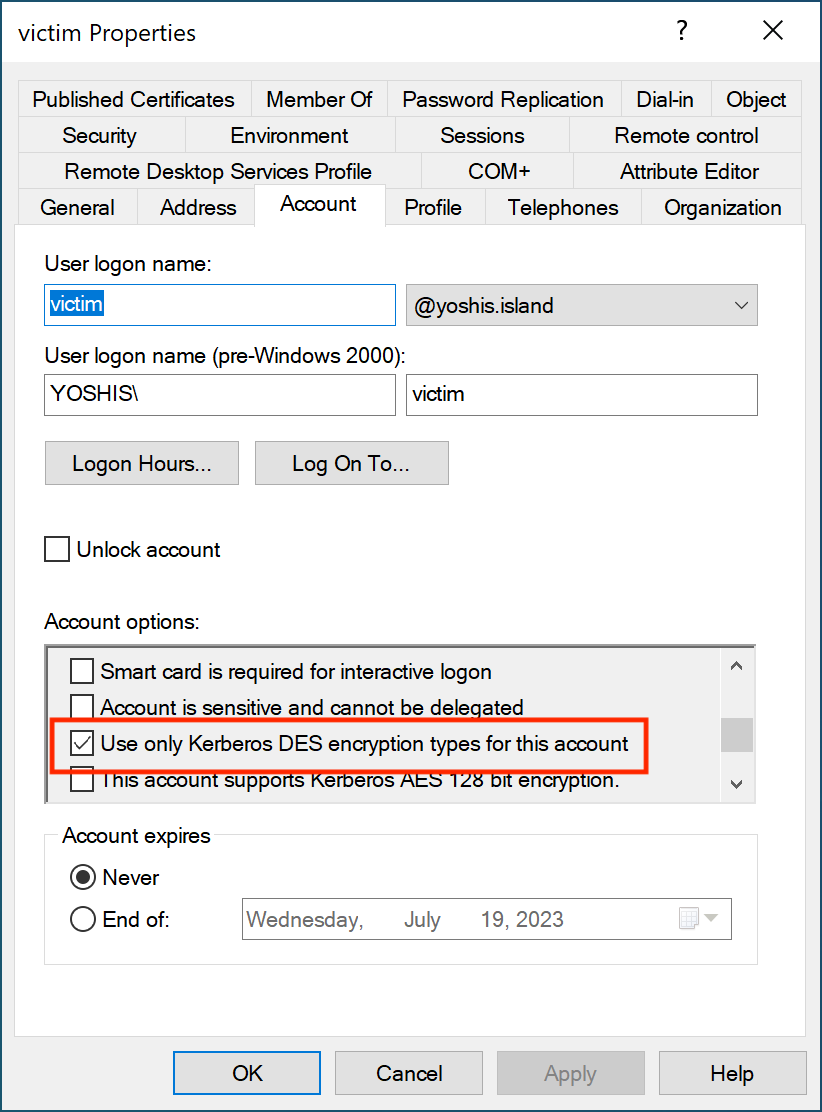
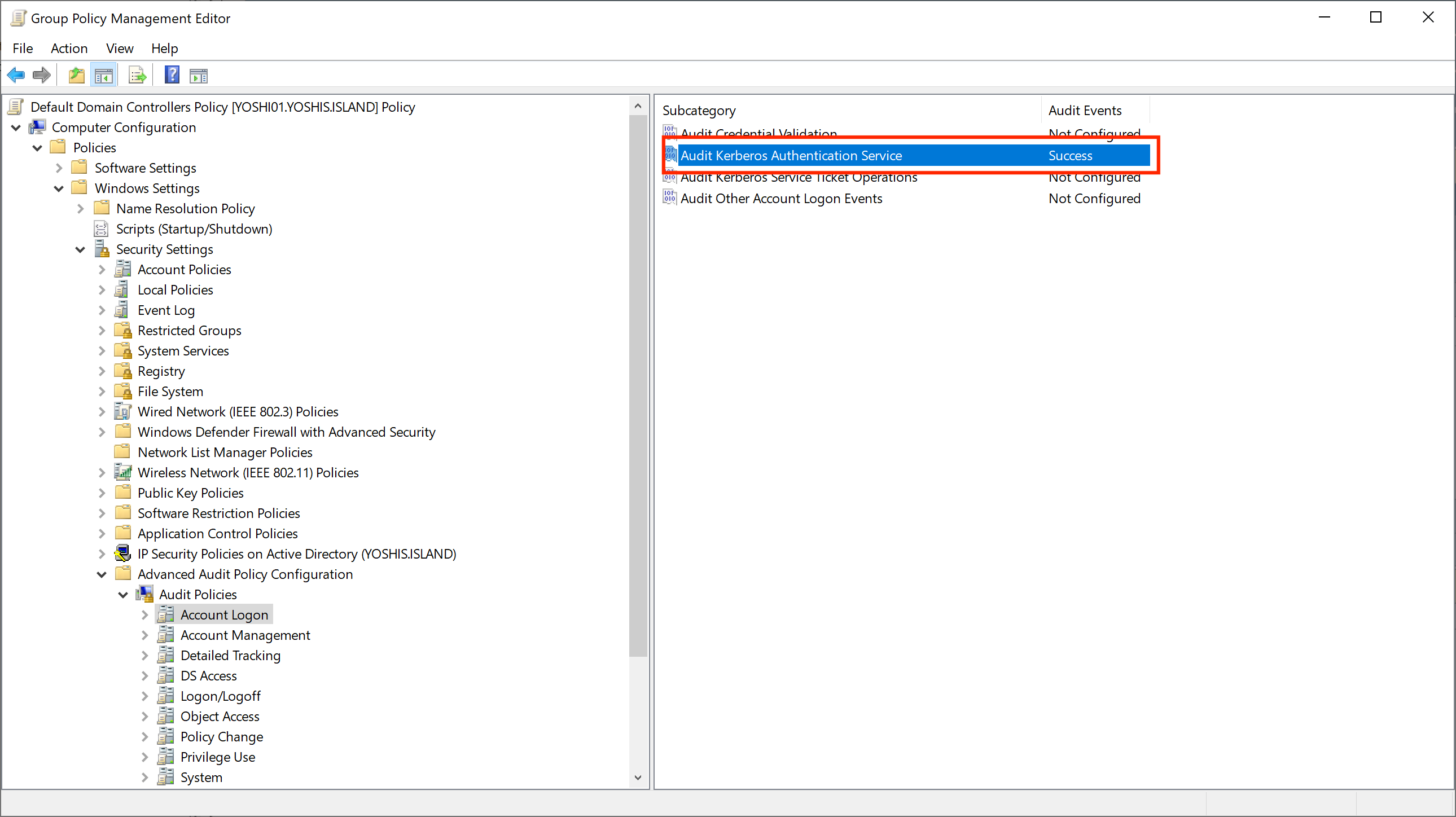
There is a way to monitor which encryption the Kerberos ticket uses using auditing. Unfortunately, despite all auditing being set up correctly for Microsoft Defender for Identity, we still need event ID 4769. We can enable auditing to create event ID 4769 using the following policy.
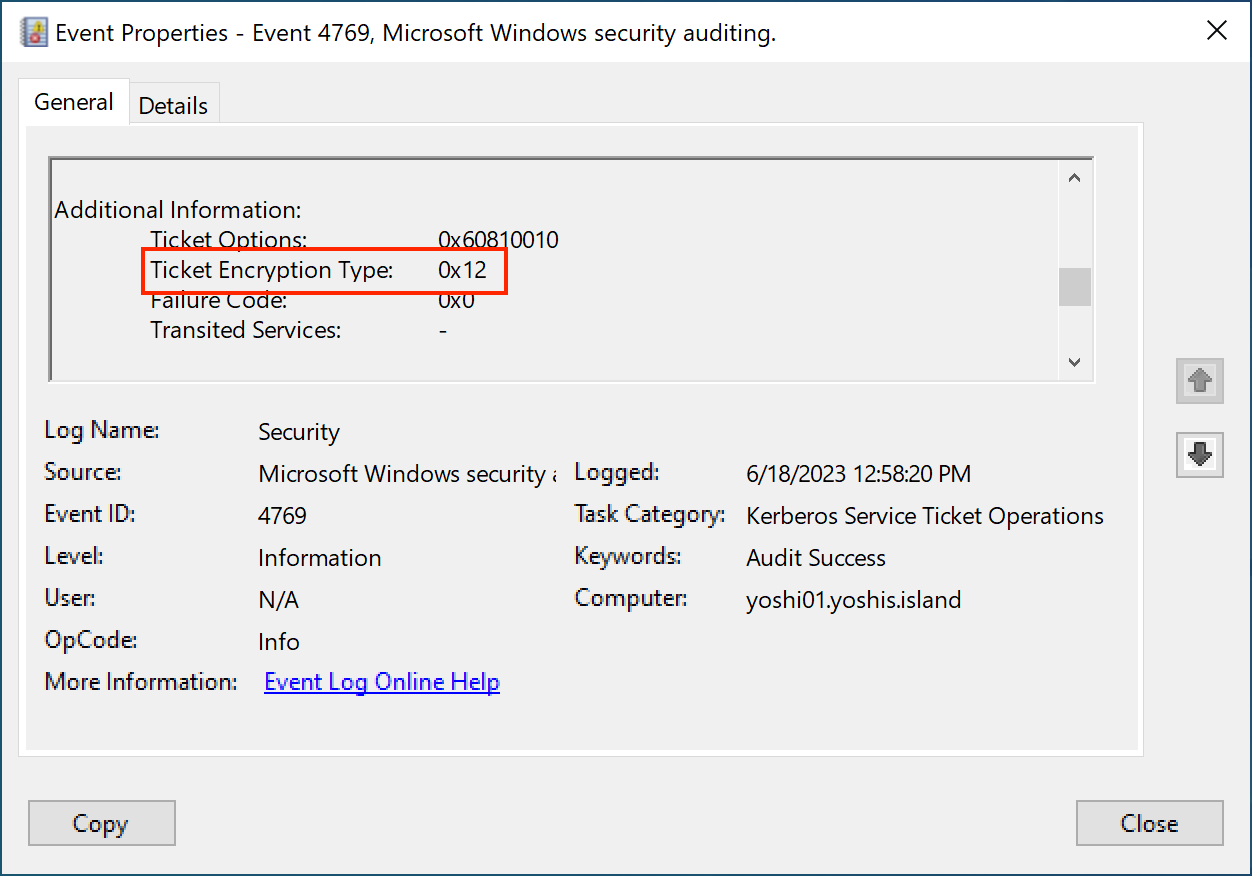
Once auditing is enabled, you can check for event ID 4769 in the event viewer and see which encryption type the Kerberos ticket uses. Encryption types 0x1 (DES-CBC-CRC) and 0x3 (DES-CBC-MD5) result from DES encryption.
Conclusion
The recommended action, “Unsecure account attributes,” is probably one of my favorites. The “Do not require Kerberos preauthentication” property is a well-known attack for a malicious actor to authenticate to the domain when no credentials are known yet. Sometimes companies do not even know that some accounts do not require passwords.
Hopefully, more recommended actions are coming to Microsoft Defender for Identity, as it is really helpful in securing your environment. The end goal for me is that everything BloodHound can do, Microsoft Defender for Identity can do as well.
 Microsoft Security Blog