
Microsoft Secure Score helps organizations get insights into security posture based on security-related measurements. Microsoft Defender for Identity leverages Secure Score with twenty-seven recommended actions. In a series of blog posts, I will go through all twenty-seven recommended actions of what it means, a plan of approach, their impact, and my security recommendations, hopefully helping others. The sixth one in the series is the “Reduce lateral movement path risks to sensitive entities” recommended action.
Introduction
You have twenty-seven recommendations if you filter the Secure Score recommended actions for Microsoft Defender for Identity.
- Resolve unsecure domain configurations
- Resolve unsecure account attributes
- Remove dormant accounts from sensitive groups
- Protect and manage local admin passwords with Microsoft LAPS
- Configure VPN integration
- Reduce lateral movement path risk to sensitive entities
- Stop clear text credentials exposure
- Disable Print spooler service on domain controllers
- Stop weak cipher usage
- Remove unsecure SID history attributes from entities
- Modify unsecure Kerberos delegations to prevent impersonation
- Install Defender for Identity Sensor on all Domain Controllers
- Set a honeytoken account
- Start your Defender for Identity deployment, installing Sensors on DC’s and other eligible servers
- Accounts with non-default Primary Group ID
- Change Domain Controller computer account old password
- Reversible passwords found in GPOs
- Unsafe permissions on the DnsAdmins group
- GPO assigns unprivileged identities to local groups with elevated privileges
- Remove access rights on suspicious accounts with the Admin SDHolder permission
- Remove local admins on identity assets
- Remove non-admin accounts with DCSync permissions
- GPO can be modified by unprivileged accounts
- Built-in Active Directory Guest account is enabled
- Change password for krbtgt account
- Change password of built-in domain Administrator account
- Ensure that all privileged accounts have the configuration flag
Some recommended actions are easy to configure, but others require time, proper planning, auditing, and expertise. This blog post will review the recommended action of “Reduce lateral movement path risk to sensitive entities.”
Update: Microsoft keeps updating the recommended actions list. I will do my best to keep the list up-to-date.
Lateral Movement Paths
Lateral movement is a technique malicious actors use to move sideways, searching for sensitive data or higher privileges. A good example is a user account having local administrator privileges on multiple devices. Once a malicious actor gets a foothold on one device and gets hold of the user’s password, the malicious actor moves sideways from one device to another using the same password until the malicious actors find what they are looking for.
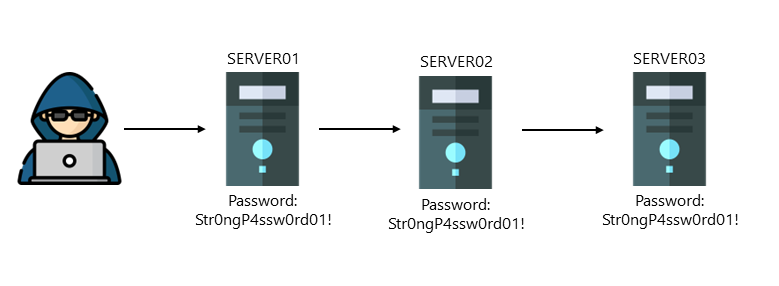
A sensitive entity is a domain administrator, for example. Microsoft Defender for Identity identifies lateral movement paths to risky entities by accessing the SAM database on every device and checking which accounts are local administrators. Suppose Microsoft Defender for Identity detects an identity that is local admin on a device where a Domain Administrator is logged on. In that case, Microsoft Defender for Identity reports this as a lateral movement path to the sensitive entity.
Risks Enabling Lateral Movement Paths
To enable Lateral Movement Paths within Microsoft Defender for Identity, you need to configure Microsoft Defender for Identity to make remote calls to the SAM database. In my previous blog post, I described the risks of enabling remote calls to the SAM database. In another blog post, I described the risk once a single sensor is compromised, a malicious actor can read all local groups and users from the compromised sensor.
Conclusion
The main goal of this blog post is to identify the risks of configuring lateral Movement paths. Microsoft does not describe the risks of implementing a feature or service, and making the best design decision is crucial, hence my blog posts.
The fact that a malicious user “only” reads the local SAM database when a sensor is compromised or uses an NTLM relay attack does not overshadow the Microsoft Defender for Identity feature to detect lateral movement paths, in my opinion.
 Microsoft Security Blog