
Microsoft Secure Score helps organizations get insights into security posture based on security-related measurements. Microsoft Defender for Identity leverages Secure Score with twenty-seven recommended actions. In a series of blog posts, I will go through all twenty-seven recommended actions and what they mean, a plan of approach, their impact, and my security recommendations, hopefully helping others. The eighth one in the series is the “Disable Print spooler service on domain controllers” recommended action.
Introduction
You have twenty-seven recommendations if you filter the Secure Score recommended actions for Microsoft Defender for Identity.
- Resolve unsecure domain configurations
- Resolve unsecure account attributes
- Remove dormant accounts from sensitive groups
- Protect and manage local admin passwords with Microsoft LAPS
- Configure VPN integration
- Reduce lateral movement path risk to sensitive entities
- Stop clear text credentials exposure
- Disable Print spooler service on domain controllers
- Stop weak cipher usage
- Remove unsecure SID history attributes from entities
- Modify unsecure Kerberos delegations to prevent impersonation
- Install Defender for Identity Sensor on all Domain Controllers
- Set a honeytoken account
- Start your Defender for Identity deployment, installing Sensors on DC’s and other eligible servers
- Accounts with non-default Primary Group ID
- Change Domain Controller computer account old password
- Reversible passwords found in GPOs
- Unsafe permissions on the DnsAdmins group
- GPO assigns unprivileged identities to local groups with elevated privileges
- Remove access rights on suspicious accounts with the Admin SDHolder permission
- Remove local admins on identity assets
- Remove non-admin accounts with DCSync permissions
- GPO can be modified by unprivileged accounts
- Built-in Active Directory Guest account is enabled
- Change password for krbtgt account
- Change password of built-in domain Administrator account
- Ensure that all privileged accounts have the configuration flag
Some recommended actions are easy to configure, but others require time, proper planning, auditing, and expertise. This blog post will review the recommended action of “Disable Print spooler service on domain controllers.”
Update: Microsoft keeps updating the recommended actions list. I will do my best to keep the list up-to-date.
Print Spooler
The print spooler is a service responsible for managing tasks sent to a server. The print spooler is a service that runs by default on almost all Windows operating systems, including Domain Controllers. The print spooler has a long history of vulnerabilities, including CVE-2021-1640, CVE-2021-1695, CVE-2021-34527, and many more.
A print spooler running on a Domain Controller is responsible for checking the availability of print queues on a published printer in Active Directory. Domain Controller deletes printers if their print queue is no longer available. The print spooler service contacts the print servers every eight hours, and if the print server is not responding, the print queue gets deleted from Active Directory. For this reason, disabling the print spooler on a Domain Controller is not that simple.
Arbitrary Code Execution
Arbitrary Code Execution is a malicious actor’s ability to run their malicious code on a target machine. You can imagine that if a malicious actor runs their code, it will be malicious and fully compromise the device. Arbitrary Code Execution is a security vulnerability where a malicious actor abuses the functionality of a vulnerability to run their malicious code. An example of the print spooler service is the “RpcAddPrinterDriverEx” function. RpcAddPrinterDriver installs a printer driver on the print server and links the configuration, data, and printer driver files.
The documentation describes the following “RpcAddPrinterDriverEx” structure.
DWORD RpcAddPrinterDriverEx(
   [in, string, unique] STRING_HANDLE pName,
   [in] DRIVER_CONTAINER* pDriverContainer,
   [in] DWORD dwFileCopyFlags
 );
The second parameter for the function is “DRIVER_CONTAINER“. If we look at the structure of “DRIVER_CONTAINER,” we see it accepts levels. Looking at “DRIVER_INFO_2,” we see an exciting parameter named “pDriverPath.” If we set the path to a path we own, we can add a malicious driver that runs under the context of the print spooler, which is SYSTEM. To make it even worse, “RpcAddPrinterDriverEx” is a function that can be accessed remotely using a Remote Procedure Call, making it Remote Code Execution. Before Microsoft patched this vulnerability, any authenticated user could add drivers to any device running the printer spooler service, including Domain Controllers.
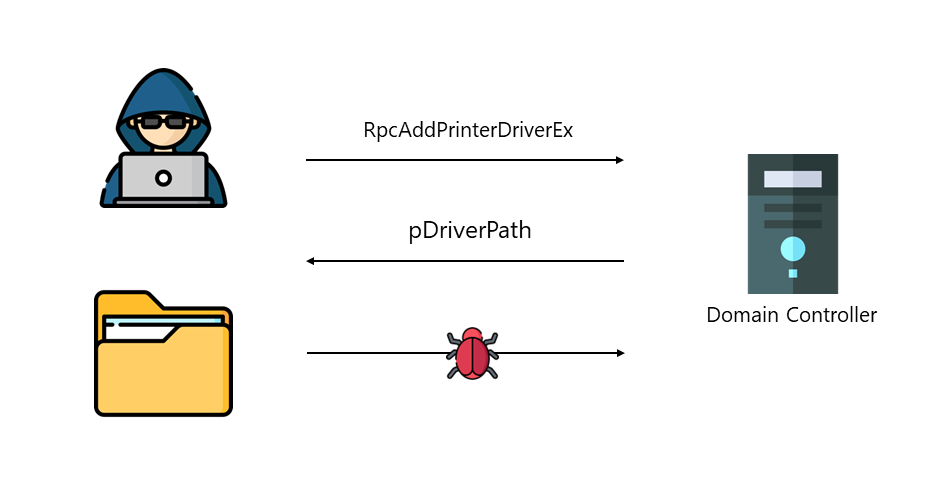
The “RpcAddPrinterDriverEx” function is just one of many examples of malicious actors abusing the print spooler service to compromise an environment. Microsoft, therefore, advises turning off the print spooler service on any device where the print spooler is not needed, especially the Domain Controller.
Disable Print spooler service on domain controllers
When you disable the print spooler on a Domain Controller, pruning published printers in Active Directory must be done manually. If a published printer is at the end of its life cycle, an Administrator must delete the printer in Active Directory. Although manually removing objects in Active Directory can be tedious, the risks with the print spooler overshadow the manual removal of objects.
You can use the PowerShell command to check for any published printer in Active Directory.
Get-AdObject -Filter "ObjectCategory -eq 'printqueue'"If there is no result from the command above, there is no published printer in Active Directory, and the print spooler on all Domain Controllers can safely be disabled. Otherwise, administrators must manually remove the printers from Active Directory when turning off the print spooler on Domain Controllers.
For the Microsoft Defender for Identity recommendation, I recommend using a Group Policy Object on the Domain Controllers to turn off the print spooler on all Domain Controllers Organization Unit.

The best-recommended action is to turn off the print spooler service on all servers that do not need the print spooler.
Conclusion
Due to the many vulnerabilities in the print spooler, which result in a complete domain take-over if the service runs on a Domain Controller, turning off the print spooler is the best mitigation. Sure, manually removing printers from Active Directory is tedious, but this does not outweigh the security risks that come with the print spooler.
 Microsoft Security Blog