
Identity leverages Secure Score with twenty-seven recommended actions. In a series of blog posts, I will go through all twenty-seven recommended actions and what they mean, a plan of approach, their impact, and my security recommendations, hopefully helping others. The twentieth one in the series is the “Remove access rights on suspicious accounts with the Admin SDHolder permission” recommended action.
Introduction
You have twenty-seven recommendations if you filter the Secure Score recommended actions for Microsoft Defender for Identity.
- Resolve unsecure domain configurations
- Resolve unsecure account attributes
- Remove dormant accounts from sensitive groups
- Protect and manage local admin passwords with Microsoft LAPS
- Configure VPN integration
- Reduce lateral movement path risk to sensitive entities
- Stop clear text credentials exposure
- Disable Print spooler service on domain controllers
- Stop weak cipher usage
- Remove unsecure SID history attributes from entities
- Modify unsecure Kerberos delegations to prevent impersonation
- Install Defender for Identity Sensor on all Domain Controllers
- Set a honeytoken account
- Start your Defender for Identity deployment, installing Sensors on DC’s and other eligible servers
- Accounts with non-default Primary Group ID
- Change Domain Controller computer account old password
- Reversible passwords found in GPOs
- Unsafe permissions on the DnsAdmins group
- GPO assigns unprivileged identities to local groups with elevated privileges
- Remove access rights on suspicious accounts with the Admin SDHolder permission
- Remove local admins on identity assets
- Remove non-admin accounts with DCSync permissions
- GPO can be modified by unprivileged accounts
- Built-in Active Directory Guest account is enabled
- Change password for krbtgt account
- Change password of built-in domain Administrator account
- Ensure that all privileged accounts have the configuration flag
Some recommended actions are easy to configure, but others require time, proper planning, auditing, and expertise. This blog post will review the recommended action of “Remove access rights on suspicious accounts with the Admin SDHolder permission.”
Update: Microsoft keeps updating the recommended actions list. I will do my best to keep the list up-to-date.
AdminSDHolder
The AdminSDHolder is a special object in Active Directory that plays a key role in protecting high-privilege accounts and groups from unintentional or malicious changes to their permissions. It acts as a security template for accounts that are members of protected groups, such as Domain Admins, Enterprise Admins, and others with elevated privileges.

Every 60 minutes by default, a background process called SDProp (Security Descriptor Propagator) runs on the domain controller holding the PDC Emulator role. This process compares the security descriptors (permissions) of protected accounts to those of the AdminSDHolder object. If any differences are found, SDProp overwrites the permissions on the protected accounts to match those of the AdminSDHolder. This ensures that even if someone tries to modify the permissions on a protected account, those changes will be reverted during the next SDProp cycle.
The mechanism is crucial for maintaining the integrity and security of privileged accounts in an Active Directory environment. However, malicious actors found a way to use this mechanism for persistence.
Persistence
When an account is a member of a protected group, like Domain Admins, Active Directory marks it as a protected object. The AdminSDHolder object contains a predefined set of permissions, a security descriptor that is considered the “gold standard” for these protected accounts. Every 60 minutes, a background process called SDProp runs and reapplies the AdminSDHolder’s permissions to all protected accounts.
All the malicious actor needs to do is add an account to the security permissions of the AdminSDHolder container, with full permissions.

If we look at the Domain Admin group permissions, we see that the “attackers” account is not yet set to the permissions of the Domain Admins group.
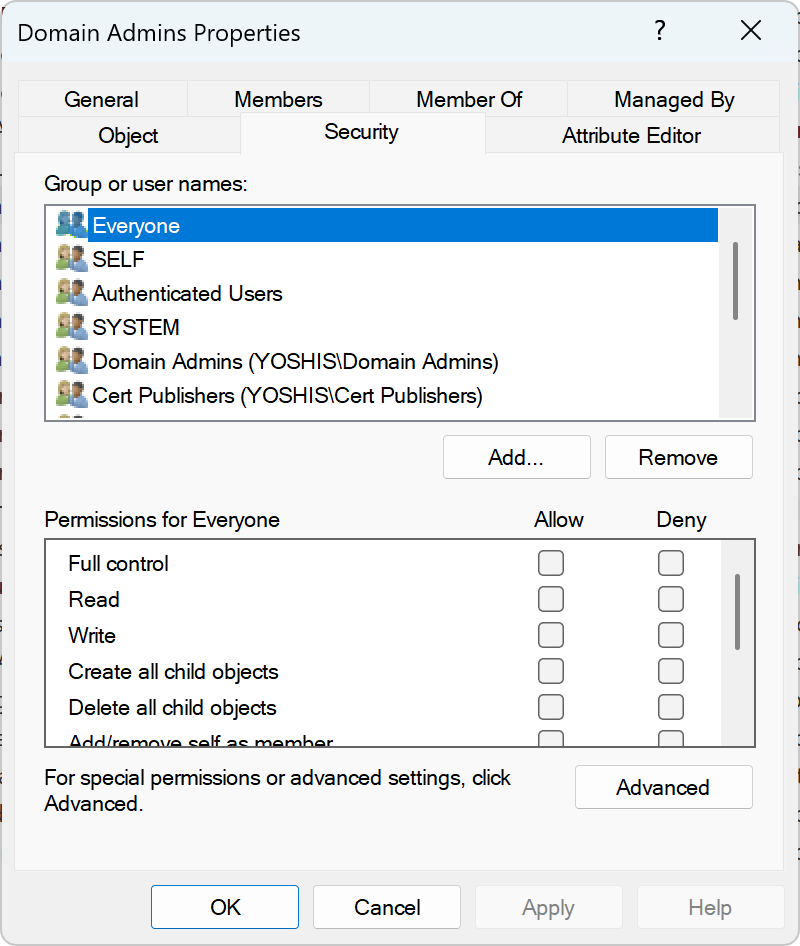
Now, if we wait an hour or we force the SDProp process, we see that due to the process, the attacker’s account gets full control over the Domain Admins group.

Even if you remove the permissions on the protected object, like the Domain Admins group, an hour later, the attacker’s account gets full control again.
Luckily, Microsoft Defender for Identity provides detection for non-administrative accounts with permissions on the AdminSDHolder container.

Conclusion
The AdminSDHolder object is a powerful and essential component of Active Directory security, designed to safeguard privileged accounts from unauthorized changes. However, as with many security mechanisms, what protects can also be exploited. Attackers who gain access to modify the AdminSDHolder can use it as a stealthy and persistent backdoor, ensuring their control over critical accounts is automatically restored, even after cleanup attempts.
Understanding how AdminSDHolder works, how SDProp enforces its permissions, and how attackers can abuse this process is crucial for any security team. Fortunately, tools like Microsoft Defender for Identity can help detect suspicious modifications and provide early warnings. Regular audits, proper monitoring, and a strong understanding of Active Directory internals are key to defending against this type of persistence.
Stay vigilant, and make sure your defenses are as persistent as the threats you are protecting against.
 Microsoft Security Blog