
Every day, employees across your organization are just a few clicks away from activating Microsoft 365 Copilot, without involving IT, without security review, and without completing any required training. By default, Microsoft enables self-service trials and purchases directly in the Microsoft 365 admin portal, meaning a motivated user can have Microsoft 365 Copilot running within minutes, whether through a free trial or a personal credit card purchase.
Table of Contents
- Microsoft 365 Admin Center: Self-service trials and purchases
- The Security Risks
- Recommendation
- Conclusion
Disclaimer: This blog post is provided for informational purposes only. While every effort has been made to ensure accuracy, implementation of these features should be performed by qualified administrators in accordance with your organization’s security and change management policies. The author is not responsible for any issues, data loss, or security incidents that may occur from following this guidance. Always test in a non-production environment first and consult official Microsoft documentation before implementing security features in production.
Microsoft 365 Admin Center: Self-service trials and purchases
Microsoft enables self-service capabilities in the admin-portal for new products by default. This means users in your organization can independently sign up for trials or purchase Microsoft 365 services, including Microsoft Copilot-related products, without IT approval. While this accelerates adoption, it creates significant governance challenges for security teams.
For Copilot specifically, a short training is often required to ensure safe and responsible usage. When users independently activate a trial, they typically bypass this onboarding process, meaning they may start using Copilot without understanding data sensitivity, prompt risks, or organizational policies. This creates a direct security risk: users could inadvertently expose confidential information or misuse AI capabilities before governance controls are in place.
Self-service encompasses two distinct scenarios:
Self-Service Trials: Users can start free trials of Microsoft products. Some trials require no payment method and simply expire after the trial period. Others require a credit card and automatically convert to paid subscriptions if not canceled.
Self-Service Purchases: Users can purchase Microsoft products using their personal credit card. The individual user becomes the billing contact, but the organization retains ownership of all data created during the subscription.
The Security Risks
When users can independently acquire Microsoft 365 Copilot licenses or related AI services, several security concerns emerge:
- Shadow AI Deployment: Copilot capabilities may be active in your environment without security review, data classification, or proper governance frameworks, and without users completing the training required for safe and responsible usage.
- Uncontrolled Data Access: Self-service users gain access to organizational data through Microsoft Copilot without assessment of their data handling requirements.
- License Sprawl: Multiple uncoordinated purchases create license management complexity and possible increase costs.
- Compliance Gaps: Departmental purchases may bypass required compliance checks, audit trails, or data residency requirements.
- Support Challenges: Users may not understand enterprise support processes, leading to shadow IT support requests.
Recommendation
Location: Microsoft 365 Admin Center > Settings > Org settings > Services > Self-service trials and purchases
The Self-service trials and purchases page displays all products eligible for self-service in your organization. For each product, you can configure one of three options:
- Allow: Users can both start trials AND purchase the product
- Allow for trials only: Users can start trials but cannot make purchases (requires admin approval to convert)
- Do not allow: Both trials and purchases are blocked entirely
Microsoft manages self-service controls on a per-product basis. There is no single switch to disable all self-service capabilities tenant-wide. You must configure each product individually.
For Microsoft 365 Copilot and related AI services, the recommended security posture is: Do not allow
This configuration:
- Blocks users from buying Microsoft 365 Copilot without IT approval
- Prevents individual purchases that bypass security review
- Ensures all Microsoft 365 Copilot deployments follow your organization’s AI governance framework
- Maintains centralized license management and cost control
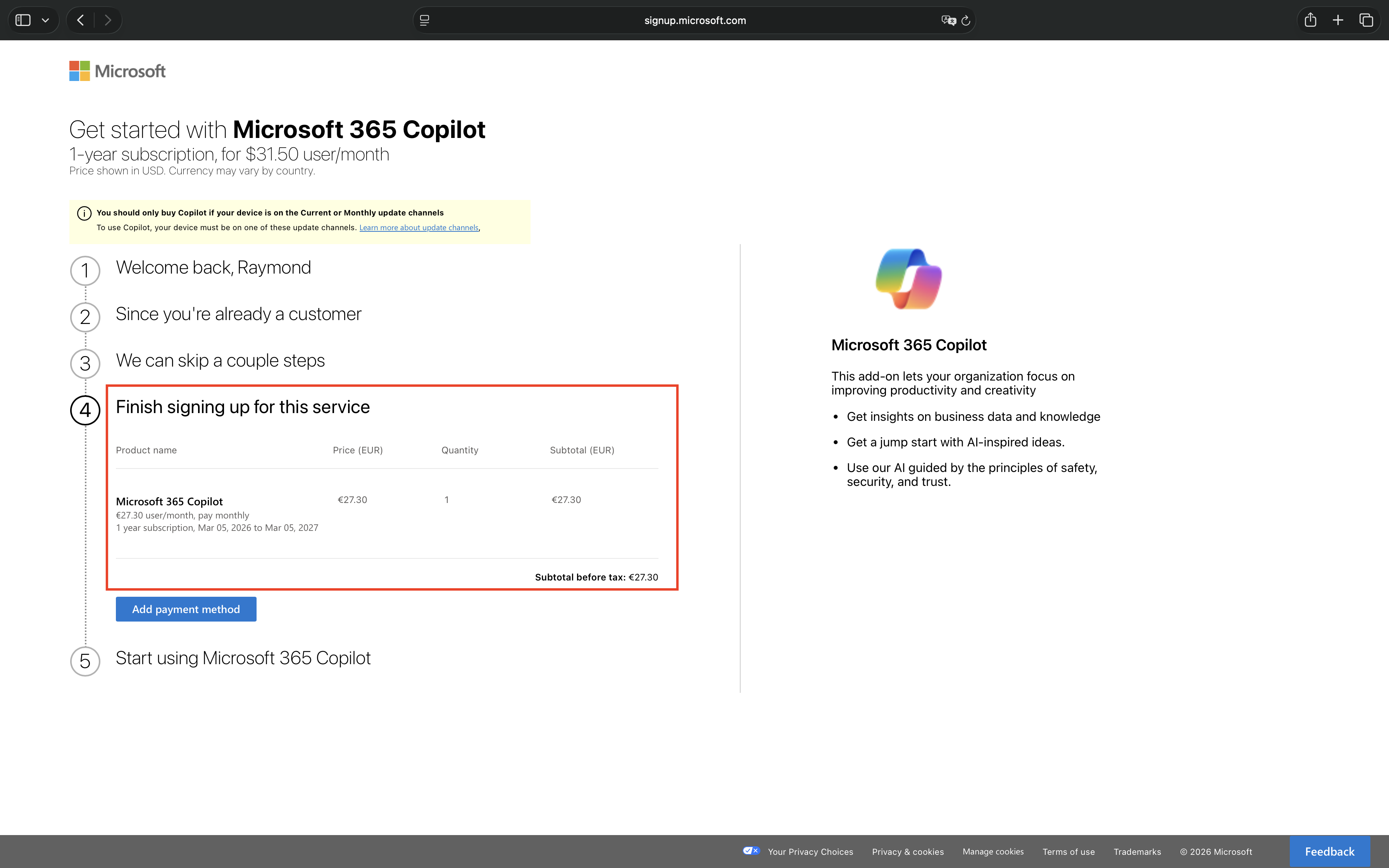
When self-service purchase is enabled, users attempting to acquire Microsoft 365 Copilot proceed directly to the checkout flow.
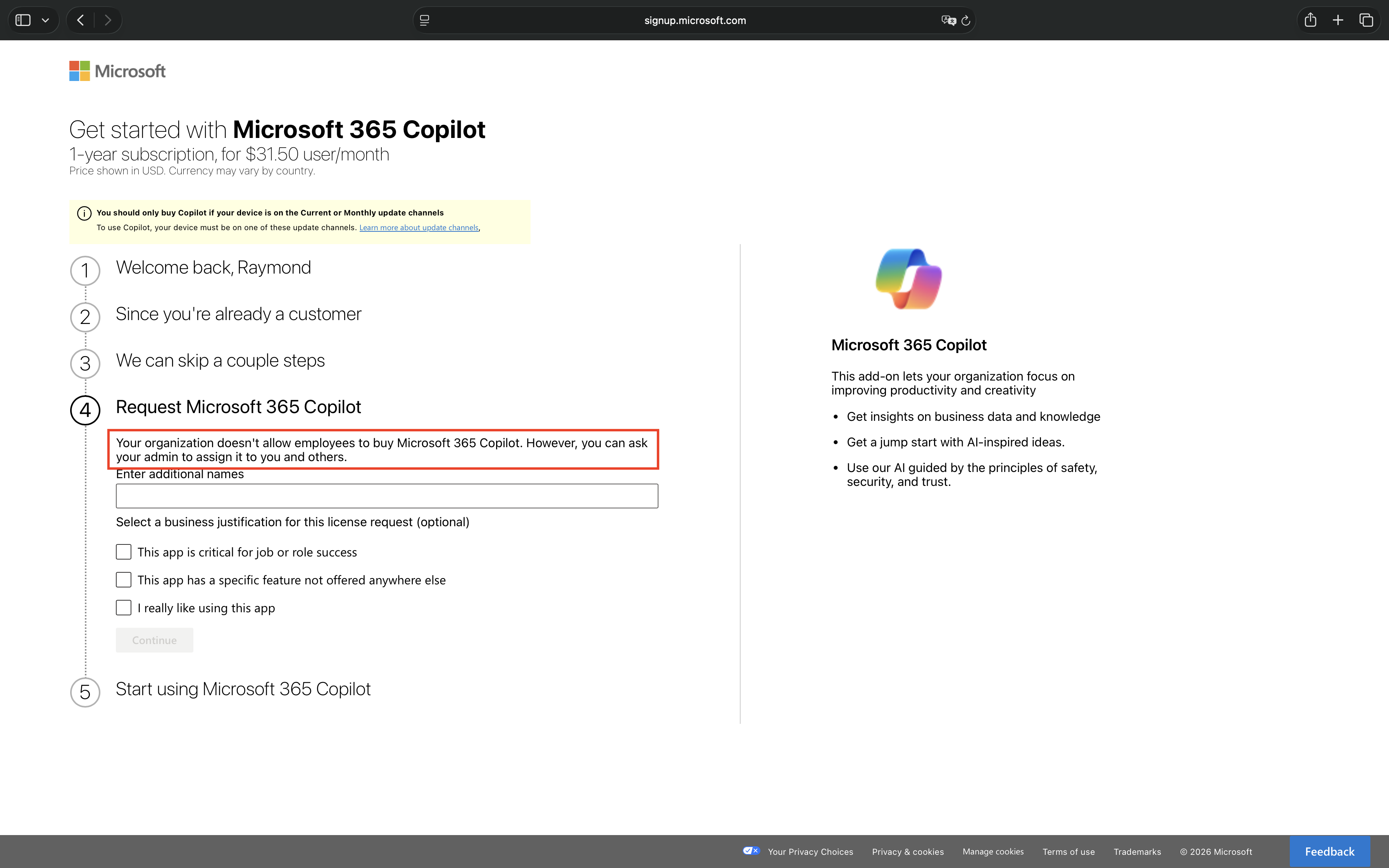
When self-service purchase is disabled, users attempting to acquire Microsoft 365 Copilot encounter a blocking message during the checkout flow.
Conclusion
The Self-service trials and purchases setting is your first line of defense in controlling not just Microsoft 365 Copilot adoption, but all self-service capable products within your organization. By configuring this setting to “Do not allow“, you prevent users from independently acquiring licenses with their personal credit cards, a scenario that creates shadow IT deployments outside your security governance framework.
Organizations must evaluate their tolerance for self-service purchases across the entire Microsoft product portfolio. Products like Power BI Pro, Power Apps, Visio, and dozens of other services are also eligible for self-service purchase. Each product represents a potential governance gap where users can bypass procurement processes, introduce unvetted tools, and create compliance risks.
Microsoft enables this capability by default for new products, requiring proactive configuration rather than reactive management. Without centralized control, users can purchase access within minutes, immediately gaining access to organizational data and creating integration points that may conflict with security policies, data classification requirements, or compliance frameworks.
This single setting, applied strategically across your product portfolio, transforms software acquisition from an uncontrolled user-driven process into a managed IT initiative where every license assignment follows your organization’s governance policies, data protection requirements, and security standards.
Recommended action: Navigate to Microsoft 365 Admin Center > Settings > Org settings > Self-service trials and purchases. Review the complete list of products available for self-service purchase and determine which products align with your organization’s risk tolerance. At minimum, set Microsoft 365 Copilot to “Do not allow” today. Consider extending this control to other high-risk or high-cost products based on your organization’s procurement and governance requirements.
 Microsoft Security Blog