
AI agents are being deployed faster than they are being governed. Every agent created in Microsoft Copilot Studio or Microsoft Foundry becomes an identity in Microsoft Entra ID. Depending on how and when the agent was created, this is either a classic Service Principal or a modern Agent Identity, each with different governance and security implications.
Unlike user accounts, agents do not have a manager. There is no automatic assignment of accountability when an agent is created. Unless explicitly configured, an agent can exist in your tenant with no one responsible for it.
An ownerless agent means:
- No one is managing its credentials or secret rotation
- No one reviews whether its permissions are still appropriate
- No one notices when it behaves anomalously
- No one decommissions it when the project ends
The agent continues to run, and continues to have access, indefinitely. This blog post explains what ownerless and sponsorless agents are, why they are a security risk, and how to detect and remediate them in your Microsoft Entra tenant.
Table of Contents
- Owner vs. Sponsor, What is the difference?
- Finding Ownerless and Sponsor-less Agents
- Recommendation
- Conclusion
Disclaimer: This blog post is provided for informational purposes only. While every effort has been made to ensure accuracy, implementation of these features should be performed by qualified administrators in accordance with your organization’s security and change management policies. The author is not responsible for any issues, data loss, or security incidents that may occur from following this guidance. Always test in a non-production environment first and consult official Microsoft documentation before implementing security features in production.
Owner vs. Sponsor, What is the difference?
Microsoft Entra Agent Identities support two distinct accountability roles:
Owner is the technical administrator responsible for operational management, setup, configuration, and credential management. The Owner is assigned to the Agent Identity Blueprint, think of the Owner as the person who keeps the blueprint and its credentials correctly configured. Because all Agent Identities inherit their configuration from the Blueprint, managing the Owner at Blueprint level covers all Agent Identities created from it.
Sponsor is the business representative accountable for the agent’s purpose and lifecycle. The Sponsor is the person who can answer: “Why does this agent exist, and is it still needed?”
Both roles are optional at creation time. Both are critical for governance. Without a Sponsor, no one can request or approve Access Packages on behalf of the agent. Without an Owner, credentials go unmanaged and anomalies go unnoticed.
Finding Ownerless and Sponsor-less Agents
Via the Entra portal: Navigate to Entra ID > Agent ID (Preview) > All agent Identities (Preview). The overview shows all agents in your tenant. Add the Agent Blueprint ID column to distinguish modern agents (with a Blueprint ID) from classic agents (Service Principals).
For modern agents, inspect the details of each agent to verify whether an Owner and Sponsor are assigned.
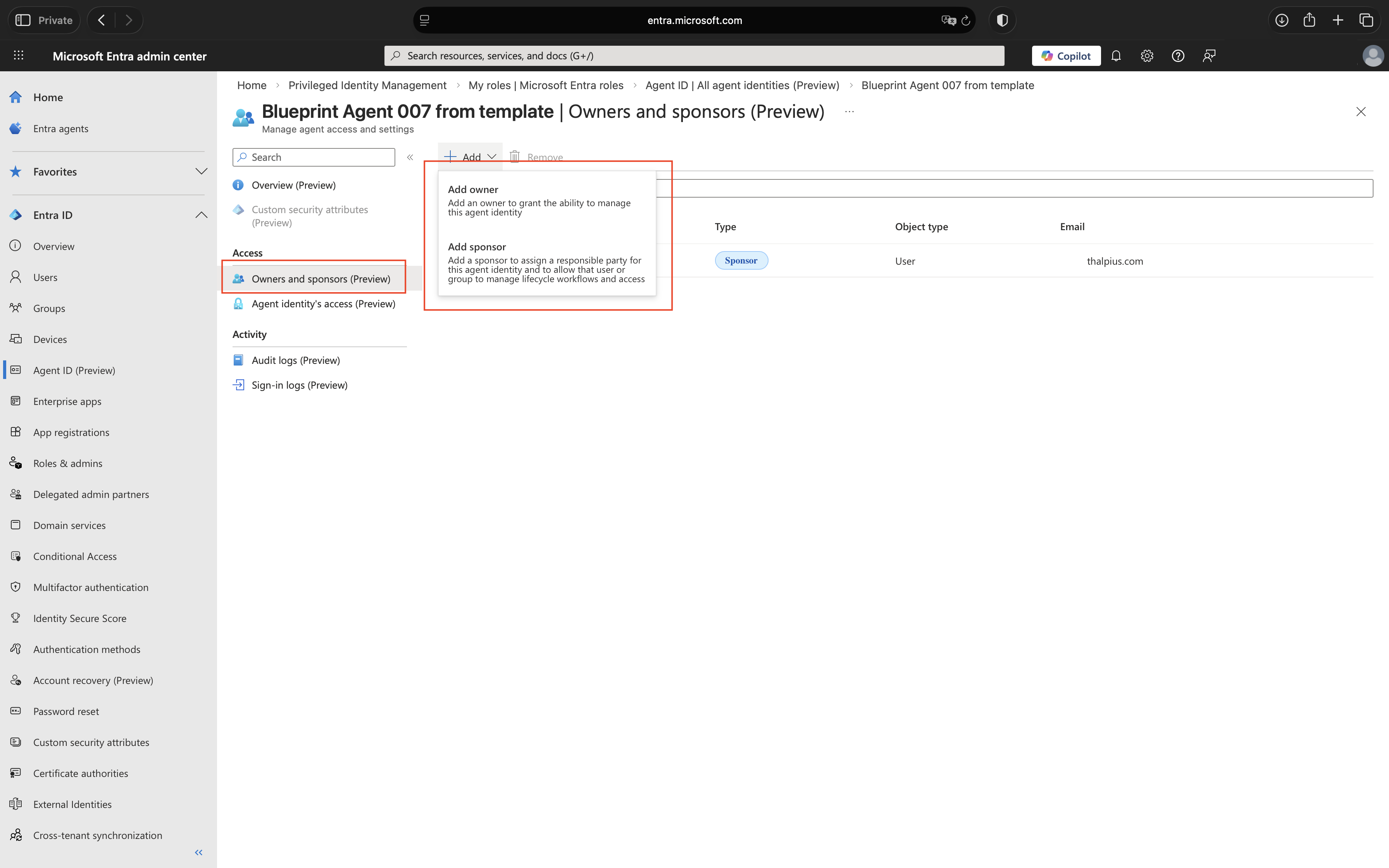
At the time of writing, the Microsoft Entra portal allows an Owner to be assigned directly to an Agent Identity. However, Microsoft documentation recommends assigning the Owner to the Agent Identity Blueprint, as all Agent Identities inherit their configuration from it.
Via Microsoft Graph API: For scale, use PowerShell to query all Agent Identities and report on missing Owners and Sponsors. Find all Agent Identities without a Sponsor and all Blueprints without an Owner:
Connect-MgGraph -Scopes "AgentIdentity.Read.All", "AgentIdentityBlueprint.Read.All"

$findings = @()

# Check Agent Identities without a Sponsor
$agents = Invoke-MgGraphRequest -Method GET `
    -Uri "https://graph.microsoft.com/beta/servicePrincipals/microsoft.graph.agentIdentity" `
    -OutputType PSObject

foreach ($agent in $agents.value) {
    $sponsors = Invoke-MgGraphRequest -Method GET `
        -Uri "https://graph.microsoft.com/beta/servicePrincipals/$($agent.id)/sponsors" `
        -OutputType PSObject

    if ($sponsors.value.Count -eq 0) {
        $findings += $agent
        Write-Host "No Sponsor: $($agent.displayName) | ID: $($agent.id)" -ForegroundColor Red
    }
}

# Check Blueprints without an Owner
$blueprints = Invoke-MgGraphRequest -Method GET `
    -Uri "https://graph.microsoft.com/beta/applications/microsoft.graph.agentIdentityBlueprint" `
    -OutputType PSObject

foreach ($blueprint in $blueprints.value) {
    $owners = Invoke-MgGraphRequest -Method GET `
        -Uri "https://graph.microsoft.com/beta/applications/$($blueprint.id)/owners" `
        -OutputType PSObject

    if ($owners.value.Count -eq 0) {
        $findings += $blueprint
        Write-Host "No Owner: $($blueprint.displayName) | ID: $($blueprint.id)" -ForegroundColor Red
    }
}

if ($findings.Count -eq 0) {
    Write-Host "No issues found. All Agent Identities have a Sponsor and all Blueprints have an Owner." -ForegroundColor Green
}

Disconnect-MgGraph
Recommendation
Owner and Sponsor assignment cannot be technically enforced at creation time, Microsoft does not provide a native policy to make these fields mandatory. The most effective approach is a combination of two controls.
Process control: Require Owner and Sponsor assignment as part of your internal agent publishing or deployment process. For Microsoft Copilot Studio this means a mandatory approval step before production publishing. For Microsoft Foundry this means including Owner binding on the Blueprint and Sponsor binding on the Agent Identity in your provisioning script. Both controls only work if everyone follows the process, direct creation via the portal or Graph API bypasses them entirely.
Detective control: Run the detection script on a recurring schedule via Azure Automation. Any agent found without an Owner or Sponsor triggers an alert for immediate remediation.
Neither control alone is sufficient. The process prevents the gap from occurring; the detection script catches what the process misses.
Script 1 – Assign an Owner to a Blueprint:
Connect-MgGraph -Scopes "AgentIdentityBlueprint.ReadWrite.All"

$blueprintId = "<Blueprint-App-ID>"
$ownerUserId = "<Owner-User-ID>"

$existingOwners = Invoke-MgGraphRequest -Method GET `
    -Uri "https://graph.microsoft.com/beta/applications/$blueprintId/owners" `
    -OutputType PSObject

$alreadyOwner = $existingOwners.value | Where-Object { $_.id -eq $ownerUserId }

if ($alreadyOwner) {
    Write-Host "Owner already assigned to Blueprint, skipping." -ForegroundColor Yellow
} else {
    $ownerBody = @{
        "@odata.id" = "https://graph.microsoft.com/beta/users/$ownerUserId"
    } | ConvertTo-Json

    Invoke-MgGraphRequest -Method POST `
        -Uri "https://graph.microsoft.com/beta/applications/$blueprintId/owners/`$ref" `
        -Body $ownerBody `
        -ContentType "application/json"

    Write-Host "Owner assigned to Blueprint successfully." -ForegroundColor Green
}

Disconnect-MgGraph
Script 2 – Assign a Sponsor to an Agent Identity:
Connect-MgGraph -Scopes "AgentIdentity.ReadWrite.All"

$agentId       = "<Agent-Object-ID>"
$sponsorUserId = "<Sponsor-User-ID>"

$existingSponsors = Invoke-MgGraphRequest -Method GET `
    -Uri "https://graph.microsoft.com/beta/servicePrincipals/$agentId/sponsors" `
    -OutputType PSObject

$alreadySponsor = $existingSponsors.value | Where-Object { $_.id -eq $sponsorUserId }

if ($alreadySponsor) {
    Write-Host "Sponsor already assigned to Agent Identity, skipping." -ForegroundColor Yellow
} else {
    $sponsorBody = @{
        "@odata.id" = "https://graph.microsoft.com/beta/users/$sponsorUserId"
    } | ConvertTo-Json

    Invoke-MgGraphRequest -Method POST `
        -Uri "https://graph.microsoft.com/beta/servicePrincipals/$agentId/sponsors/`$ref" `
        -Body $sponsorBody `
        -ContentType "application/json"

    Write-Host "Sponsor assigned to Agent Identity successfully." -ForegroundColor Green
}

Disconnect-MgGraph
Conclusion
A Blueprint without an Owner or an Agent Identity without a Sponsor is an identity without accountability. It can accumulate permissions, run indefinitely, and operate completely outside your governance framework, not because someone made a bad decision, but because no one made any decision at all.
Microsoft makes Owner and Sponsor optional at creation time. That default is a governance risk. The detection script gives you visibility today. The process control reduces the gap tomorrow, but only if consistently followed. Schedule the script to run on a recurring basis so exceptions are caught before they become incidents.
Recommended action: Run the detection script against your tenant. For every agent without an Owner or Sponsor, assign one before the end of the week. Then build the assignment into your agent deployment process so it never happens again.
 Microsoft Security Blog