Microsoft Defender for Identity Recommended Actions: Install Defender for Identity Sensor on all Domain Controllers

Microsoft Defender for Identity Recommended Actions: Install Defender for Identity Sensor on all Domain Controllers

Microsoft Secure Score helps organizations get insights into security posture based on security-related measurements. Microsoft Defender for Identity leverages Secure Score with tweny-seven recommended actions. In a series of blog posts, I will go through all twenty-seven recommended actions and what they mean, a plan of approach, their impact, and my security recommendations, hopefully helping others. The twelfth one in the series is the “Install Defender for Identity Sensor on all Domain Controllers” recommended action.

Introduction

You have twenty-seven recommendations if you filter the Secure Score recommended actions for Microsoft Defender for Identity.

Some recommended actions are easy to configure, but others require time, proper planning, auditing, and expertise. This blog post will review the recommended action of “Install Defender for Identity Sensor on all Domain Controllers.”

Update: Microsoft keeps updating the recommended actions list. I will do my best to keep the list up-to-date.

Microsoft Defender for Identity Sensor

This recommended action will probably be the shortest of them all. Microsoft recommends installing Microsoft Defender for Identity on all Domain Controllers. Microsoft recommends installing the Microsoft Defender for Identity sensor because Microsoft Defender for Identity monitors malicious attacks using events saved in the event viewer and by capturing packets using NPCAP. The event is not the issue, but the packet capture is. Forwarding all packets from all Domain Controllers is not doable. For this reason, Microsoft also does not recommend using the stand-alone version of Microsoft Defender for Identity.

Image 1: Events can be forwarded, but network packets not

Although I mentioned the Domain Controllers, this applies to all servers, including the AD FS servers, AD CS servers, and AD Connect.

Conclusion

Even if it is a Proof-of-Concept for Microsoft Defender for Identity, I always recommend installing the Microsoft Defender for Identity sensor on all servers. The sensor is a lightweight agent that does not use many resources and can easily be uninstalled.

Microsoft Defender for Identity Recommended Actions: Unsecure Kerberos delegation

Microsoft Defender for Identity Recommended Actions: Unsecure Kerberos delegation

Microsoft Secure Score helps organizations get insights into security posture based on security-related measurements. Microsoft Defender for Identity leverages Secure Score with tweny-seven recommended actions. In a series of blog posts, I will go through all twenty-seven recommended actions and what they mean, a plan of approach, their impact, and my security recommendations, hopefully helping others. The eleventh one in the series is the “Unsecure Kerberos delegation” recommended action.

Introduction

You have twenty-seven recommendations if you filter the Secure Score recommended actions for Microsoft Defender for Identity.

Some recommended actions are easy to configure, but others require time, proper planning, auditing, and expertise. This blog post will review the recommended action of “Modify unsecure Kerberos delegations to prevent impersonation.”

Update: Microsoft keeps updating the recommended actions list. I will do my best to keep the list up-to-date.

Kerberos Delegation

Kerberos delegation allows resources to access data or other resources on behalf of an identity. A good example is a web server as a front-end server and a database server as its back-end. When a user accesses a web server, the web server requests data from the database server on behalf of the user.

Image 1: Unconstrained Delegation

There are three essential types of delegation.

  1. Unconstrained delegation
  2. Constrained delegation
  3. Resouce-Based Constrained Delegation

Unconstrained Delegation

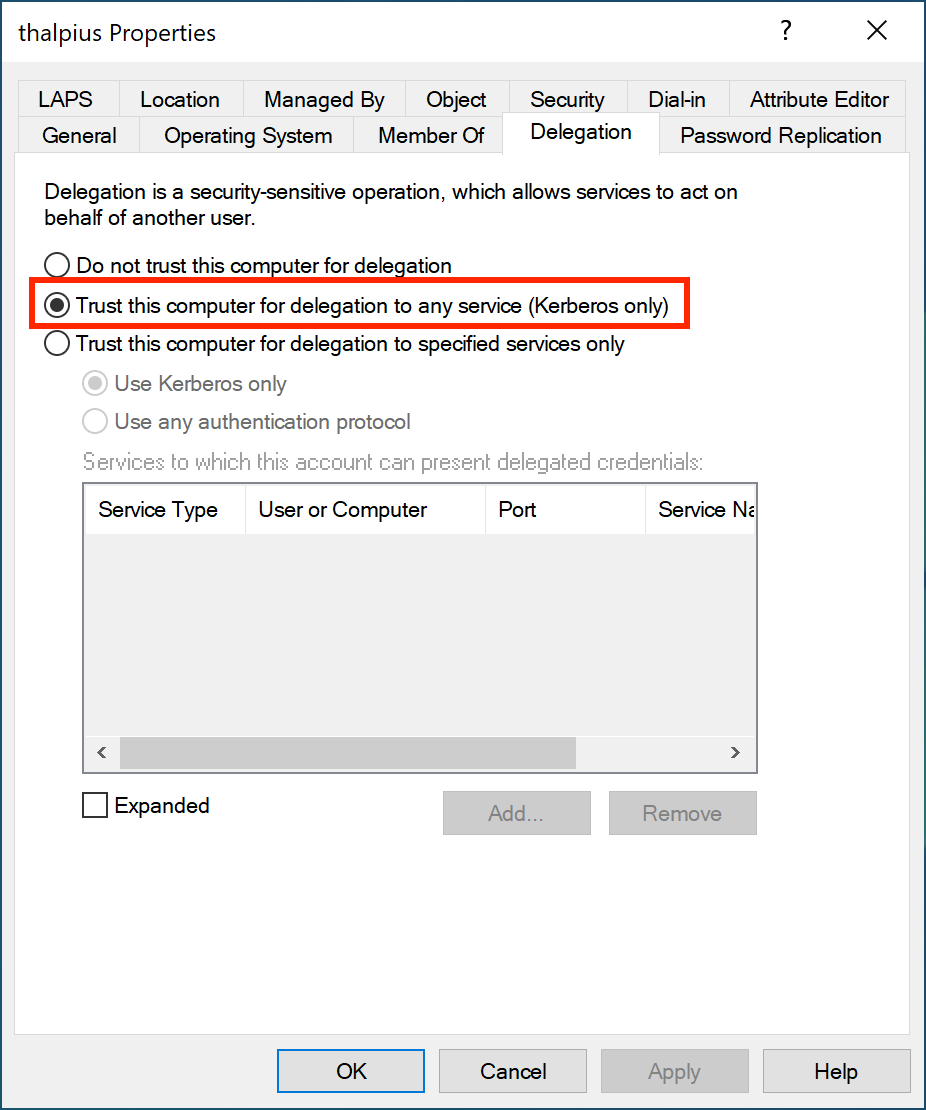
With unconstrained delegation, the web server can access any service within the domain on behalf of the user. To enable unconstrained delegation, check the following option in Active Directory.

Image 2: Unconstrained Delegation set in Active Directory

What happens with the Kerberos flow is as follows.

If Unconstrained Delegation is enabled, when requesting a Ticket Granting Service ticket (TGS), the Domain Controller adds the user’s Ticket Granting Ticket (TGT) to the TGS. Once the service receives the TGS, it extracts it and saves the user’s TGT in its memory. Imagine hundreds of users accessing the web server application; there will be hundreds of TGTs in the web server’s memory. Once the web server is compromised, a malicious actor can act as hundreds of users within the entire domain. To mitigate this risk, Microsoft came up with constrained delegation.

Note: Domain Controllers always have an unconstrained delegation set and are not identified by Microsoft Defender for Identity as an exposed entity.

Constrained Delegation

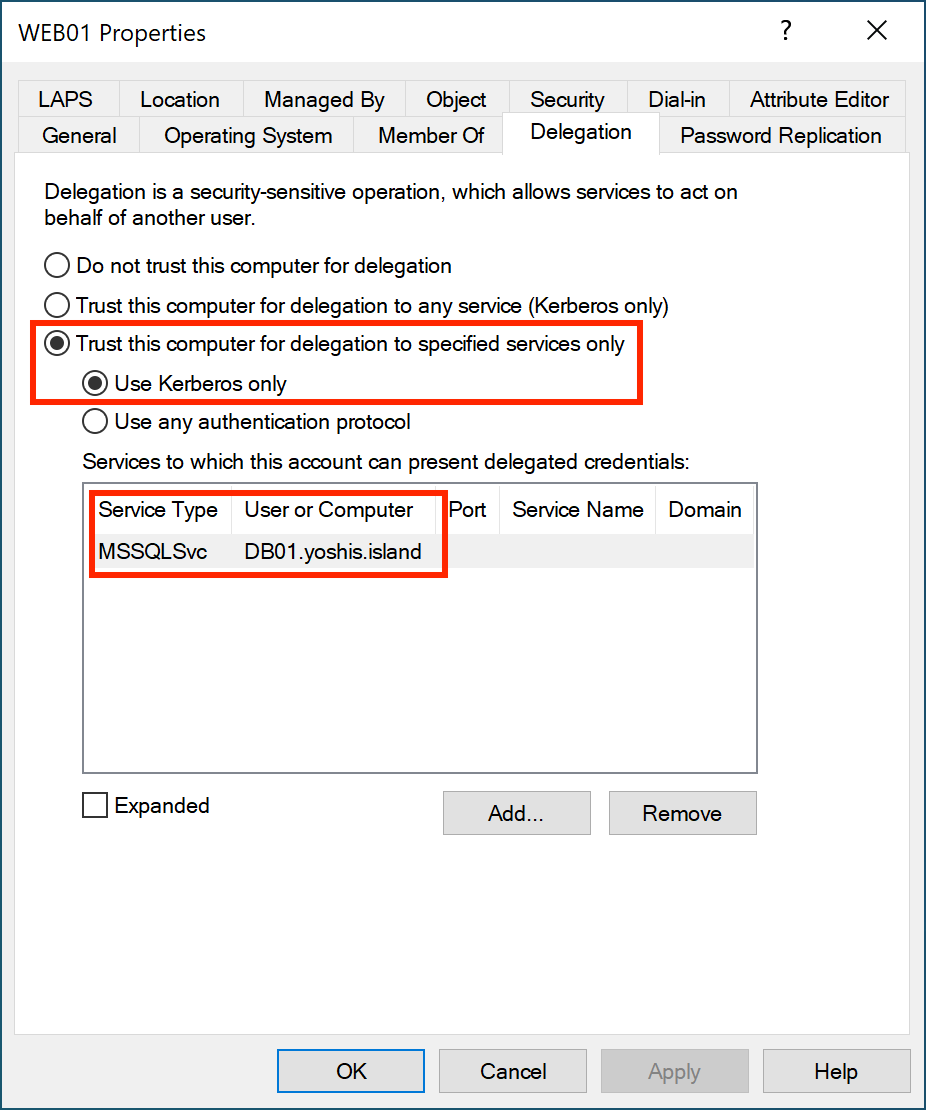
With constrained delegation, the web server can access specified services within the domain on behalf of the user. To enable constrained delegation, check the following option in Active Directory.

Image 3: Constrained Delegation set in Active Directory

If constrained delegation is enabled, when requesting a TGS, the Domain Controller sends the TGS to the user, and the user sends the TGS to the web server. The web server can request a TGS for the database server, but ONLY for the database server and its service.

Image 4: Constrained Delegation

If the web server is compromised, yes, a malicious actor does have valid tickets, but only for a particular server and service. Sure, it is still bad, but not as bad as hundreds of valid TGTs that a malicious actor uses to request a TGS for anyserver and service.

Resource-Based Constrained Delegation

Resource-Based Constrained Delegation (RBCD) is similar to constrained delegation. The difference is that with RBCD, resources like computer objects are configured to whom they can trust. However, constrained delegation tells the object what resources it can delegate to.

Unsecure Kerberos Delegation

Microsoft Defender for Identity identifies identities with unconstrained delegation. Microsoft recommends changing unconstrained delegation to constrained delegation or removing any delegation by changing the option to “Do not trust this computer for delegation” on the identity.

Suppose any identity is using Unconstrained Delegation. In that case, I recommend changing it to Constrained Delegation, or if it is a user account and not a service account, remove delegation altogether. Unconstrained delegation is probably unnecessary, but checking which service the account needs access to is easy.

Conclusion

Besides the Domain Controllers, no object within Active Directory needs to use Unconstrained Delegation. Change the Unconstrained Delegation to Constrained Delegation or remove any delegation by setting the option “Do not trust this computer for delegation” on the object itself. Microsoft Defender for Identity helps identify identities with an unsecured delegation set.

Microsoft Defender for Identity Recommended Actions: Remove unsecure SID history attributes from entities

Microsoft Defender for Identity Recommended Actions: Remove unsecure SID history attributes from entities

Microsoft Secure Score helps organizations get insights into security posture based on security-related measurements. Microsoft Defender for Identity leverages Secure Score with twenty-seven recommended actions. In a series of blog posts, I will go through all twenty-seven recommended actions and what they mean, a plan of approach, their impact, and my security recommendations, hopefully helping others. The tenth one in the series is the “Remove unsecure SID history attributes from entities” recommended action.

Introduction

You have twenty-seven recommendations if you filter the Secure Score recommended actions for Microsoft Defender for Identity.

Some recommended actions are easy to configure, but others require time, proper planning, auditing, and expertise. This blog post will review the recommended action of “Remove unsecure SID history attributes from entities.”

Update: Microsoft keeps updating the recommended actions list. I will do my best to keep the list up-to-date.

Security Identifier

Every object in Active Directory holds a unique Security Identifier or abbreviated SID. When an object migrates from one forest to another, the object gets a new SID. Any permissions set using the object in the source forest do not work anymore because of the new SID. When using SID history, the permissions set still works.

After migrating the object and setting new permissions, you can remove the SIDs. If not, you need to check the SID set on the source forest and set the permissions for the new object. Depending on the organization, this takes time.

SID History

As mentioned in the introduction, every object in Active Directory holds a unique Security Identifier. Although most objects have a friendly name, Windows uses the SID under the hood to identify an object. Here is an example of a SID.

S-1-5-21-1004336348-1177238915-682003330-512

The S indicates the SID is a string, the one after the S is the revision level, and the five after the 1 is the identifier authority. The following four parts of the SID are the domain identifier, which differs per domain. The last part in this example is the relative identifier. In the example above, 512 is the Domain Administrators group. In every domain, the SID for the Domain Administrators will always be 512.

Luckily, Microsoft has well-documented the Security Identifier.

The part we will focus on is the domain identifier. In most domains, the Domain Administrators group will start with S-1-5-21 and end with 512, but the domain identifier will never be the same. If a migration takes place where an object, let us say a user account, is migrated to another domain, the domain identifier will change. Migrating an object from domain to domain is only an issue if you want the object to keep having access to resources in the original domain.

Although the name does not change, the SID does. Since Windows uses the SID to identify an object, access to the original domain no longer works. Using SID history, the object keeps its access to the resources in the original domain.

Image 1: SID changed after migration of the object

In the image above, you see a user migrated to another forest. The objectSID is different than the original objectSID since it is a new object in a new forest. When the user accesses a resource in the “old” forest due to SID history, the user still has access as Windows validates the access using the SID. Without an SID history, the new SID cannot access the resources in the “old” forest.

SID Filtering

Imagine if a malicious actor compromises Forest B, adds the SID for the Domain Admins group for Forest A, and authenticates to a resource in Forest A. Since the malicious actor has complete control over Forest B, creating their ticket and adding SIDs is possible. Luckily, Microsoft prevents high-privilege groups from adding to a ticket when you authenticate cross-forest due to SID filtering.

When you present a ticket from Forest B to Forest A and request a service ticket, specific high-privilege SIDs like Domain, Schema, and Enterprise Administrators are filtered out. Without the filter, once a malicious actor compromises a forest and there is a forest trust, all trusted forests are instantly compromised.

Unfortunately, only high-privileged groups are filtered out. A malicious actor can still add SIDs from groups, which makes the malicious actor authenticate to resources in the other forest.

Migration

Remove all SID history from your objects within Active Directory to prevent a malicious actor from using it to compromise resources in another forest. After a complete migration of the objects from Forest A to Forest B, there is no need for SID history.

Unfortunately, not all SID history gets deleted from all objects in the new forest after migration. Microsoft Defender for Identity identifies objects within Active Directory with SID history. Use the PowerShell command to search for users with SID history enabled.

Get-ADUser -Filter {SIDHistory -like $SID} -Properties SIDHistory | Select Name, Enabled, SIDHistory

Suppose no resource in a trusted forest uses SID history. In that case, deleting all SID history on the objects within Active Directory mitigates the risks of malicious actors accessing resources in another forest.

Conclusion

Not all administrators consider SID history a risk. Luckily, Microsoft Defender for Identity identifies objects with SID history, and removing it mitigates the risk of a successful attack from forest to forest. There is no need for SID history in a single-forest, single-domain environment. If any SID history is left in a single-forest, single-domain environment, removing SID history for all objects in Active Directory is a must. Then again, if no migration is running or objects from one forest need to access resources in another, removing SID history is also a must.

Microsoft Defender for Identity Recommended Actions: Stop weak cipher usage

Microsoft Defender for Identity Recommended Actions: Stop weak cipher usage

Microsoft Secure Score helps organizations get insights into security posture based on security-related measurements. Microsoft Defender for Identity leverages Secure Score with twenty-seven recommended actions. In a series of blog posts, I will go through all twenty-seven recommended actions and what they mean, a plan of approach, their impact, and my security recommendations, hopefully helping others. The ninth one in the series is the “Stop weaker cipher usage” recommended action.

Introduction

You have twenty-seven recommendations if you filter the Secure Score recommended actions for Microsoft Defender for Identity.

Some recommended actions are easy to configure, but others require time, proper planning, auditing, and expertise. This blog post will review the recommended action of “Stop weak cipher usage.”

Update: Microsoft keeps updating the recommended actions list. I will do my best to keep the list up-to-date..

Ciphers

Before we discuss the recommendation in detail, let me explain briefly what a cipher is. A cipher is a term used in cryptography to encrypt and decrypt data, and it is also known as an encryption algorithm. A cipher converts plain-text data into unreadable data, which is called encryption. To read the data, you often need a key to decrypt the encrypted data to make it readable again.

Most ciphers are complex and well beyond this blog post, but simple chipers like the ROT-13 cipher exist. ROT-13 is a substitution cipher that replaces the plain text with ciphertext, making it unreadable. Here is an example of using the ROT-13 cipher on the text “thalpius.”

Plaintext: thalpius
Ciphertext: gunycvhf

ROT-13 rotates the letters in the alphabet thirteen places. So, “t” becomes the letter “g” when moving thirteen places backward in the alphabet. ROT-13 is called the Caesar cipher, which Julius Caesar used in the 1st century BC. As you might have guessed, ROT-13 is a weak cipher. Luckily, ROT-13 is not a cipher used within a Microsoft environment. What is a weak cipher used in a Microsoft environment, though, is Data Encryption Standard (DES) Triple Data Encryption Algorithm (3DES) and Rivest Cipher 4 (RC4).

Weak Ciphers

Microsoft specifically discusses DES/3DES and RC4 as weak ciphers in their documentation. DES is from the 1970s and is susceptible to brute-force attacks, and 3DES is from the 1980s and is vulnerable to collision attacks. There is an option in Active Directory to force DES encryption for Kerberos authentication.

Image 1: Enforce DES encryption on identity

Since DES and 3DES are forty years old, it is unsurprising that modern technology makes these ciphers easy to crack. I doubt that forcing DES encryption on any account within the Active Directory was done intentionally. If there is any account with DES as an encryption method, please check if the application or service only understands DES as an encryption type and if it supports a higher encryption method like AES256.

Auditing

Microsoft Defender for Identity identifies identities with a weak cipher like DES/3DES and RC4. There is an auditing option if you want to audit the Kerberos encryption types. Since Microsoft Defender for Identity does not require the “Kerberos Service Ticket Operations” audit, I guess Microsoft Defender for Identity identifies the encryption types checking the packets sent to the Domain Controllers.

The policy to enable auditing Kerberos encryption types is called “Audit Kerberos Authentication Service.

Image 2: Enable auditing for Kerberos tickets in security log

The Domain Controller where the authentication occurs saves a log with Event ID 4769 in the security log.

Image 3: Event ID 4769 after enabling auditing

In the Additional Information section of event 4769, you will find the encryption type used during authentication.

Additional Information:

Ticket Options: 0x60810010
Ticket Encryption Type: 0x12
Failure Code: 0x0
Transited Services: -

The Kerberos Ticket Encryption Type in the example above equals the hexadecimal value 12. Here are the most common encryption types and their hexadecimal values.

TypeName
0x1DES-CBC-CRC
0x3DES-CBC-MD5
0x11AES128-CTS-HMAC-SHA1-96
0x12AES256-CTS-HMAC-SHA1-96
0x17RC4-HMAC
0x18RC4-HMAC-EXP
Table 1: Kerberos Encryption Types

So, in my example, the encryption used for the authentication is AES256-CTS-HMAC-SHA1-96, which is the cipher we want to enforce for all our authentication.

Advanced Encryption Standard

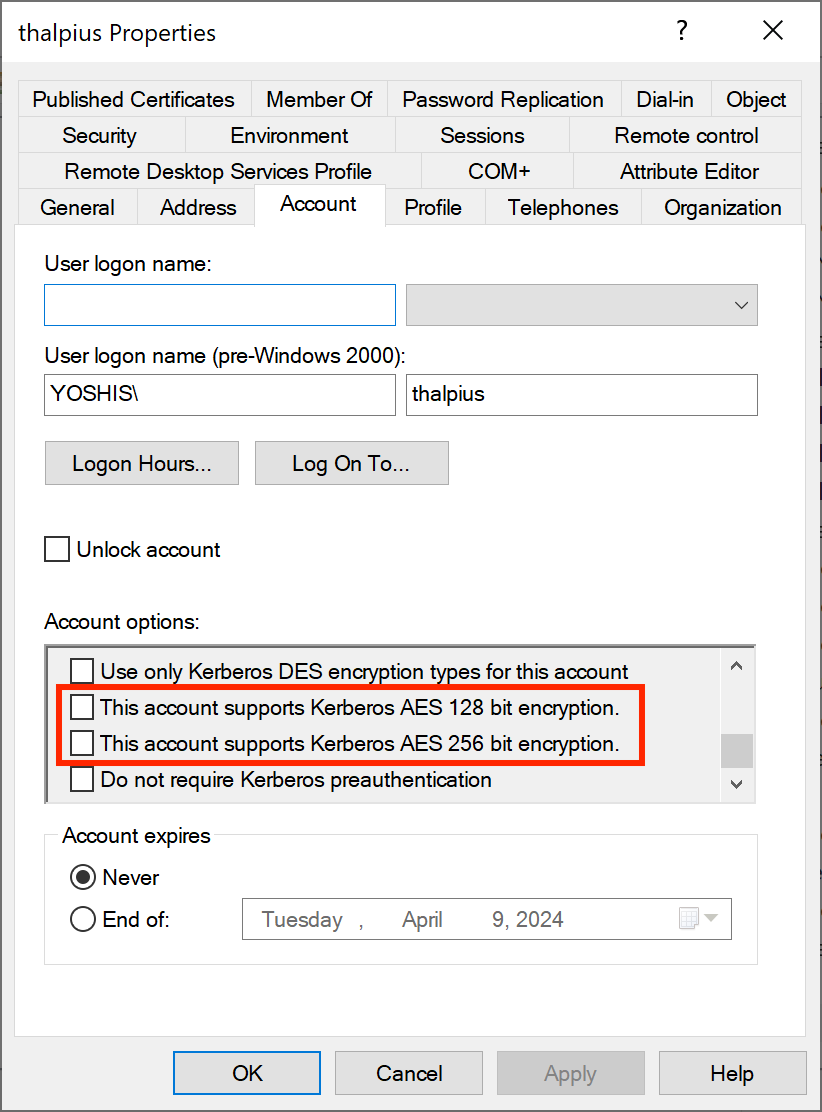
DES, 3DES, and RC4 are considered weak ciphers, and there is an option to enforce a stronger cipher for Kerberos authentication like AES.

Image 4: Support AES encryption, but not enforcing AES encryption

There is a catch, though, which I want to address using this blog post.

Important: Suppose you enable “This account supports Kerberos AES 256-bit encryption” on an identity. In that case, it only means the identity SUPPORTS AES encryption, but it still allows an attacker to request an RC4 encrypted ticket, which they can brute-force and get a plain-text password.

So, even when the recommended action shows no exposed identities and all identities can support Kerberos AES encryption, it does not mean the identity is safe. You have to force only AES encryption using a policy on the Domain Controllers to force AES and AES only.

Image 5: Allow AES256 as the only encryption type for all Domain Controllers

Only then is the strong cipher AES used to encrypt Kerberos tickets, making a downgrade attack to RC4 impossible.

Conclusion

Be sure to turn off weak ciphers using the policy “Network security: Configure encryption types allowed for Kerberos” to prevent a downgrade attack to RC4 and lower the risk of a successful compromise.

Microsoft Defender for Identity is a perfect way to identify weak ciphers like DES/3DES and RC4, but be sure to turn off weak ciphers using the above mentioned policy.

Microsoft Defender for Identity Recommended Actions: Disable Print spooler service on domain controllers

Microsoft Defender for Identity Recommended Actions: Disable Print spooler service on domain controllers

Microsoft Secure Score helps organizations get insights into security posture based on security-related measurements. Microsoft Defender for Identity leverages Secure Score with twenty-seven recommended actions. In a series of blog posts, I will go through all twenty-seven recommended actions and what they mean, a plan of approach, their impact, and my security recommendations, hopefully helping others. The eighth one in the series is the “Disable Print spooler service on domain controllers” recommended action.

Introduction

You have twenty-seven recommendations if you filter the Secure Score recommended actions for Microsoft Defender for Identity.

Some recommended actions are easy to configure, but others require time, proper planning, auditing, and expertise. This blog post will review the recommended action of “Disable Print spooler service on domain controllers.”

Update: Microsoft keeps updating the recommended actions list. I will do my best to keep the list up-to-date.

Print Spooler

The print spooler is a service responsible for managing tasks sent to a server. The print spooler is a service that runs by default on almost all Windows operating systems, including Domain Controllers. The print spooler has a long history of vulnerabilities, including CVE-2021-1640CVE-2021-1695CVE-2021-34527, and many more.

A print spooler running on a Domain Controller is responsible for checking the availability of print queues on a published printer in Active Directory. Domain Controller deletes printers if their print queue is no longer available. The print spooler service contacts the print servers every eight hours, and if the print server is not responding, the print queue gets deleted from Active Directory. For this reason, disabling the print spooler on a Domain Controller is not that simple.

Arbitrary Code Execution

Arbitrary Code Execution is a malicious actor’s ability to run their malicious code on a target machine. You can imagine that if a malicious actor runs their code, it will be malicious and fully compromise the device. Arbitrary Code Execution is a security vulnerability where a malicious actor abuses the functionality of a vulnerability to run their malicious code. An example of the print spooler service is the “RpcAddPrinterDriverEx” function. RpcAddPrinterDriver installs a printer driver on the print server and links the configuration, data, and printer driver files.

The documentation describes the following “RpcAddPrinterDriverEx” structure.

DWORD RpcAddPrinterDriverEx(
[in, string, unique] STRING_HANDLE pName,
[in] DRIVER_CONTAINER* pDriverContainer,
[in] DWORD dwFileCopyFlags
);

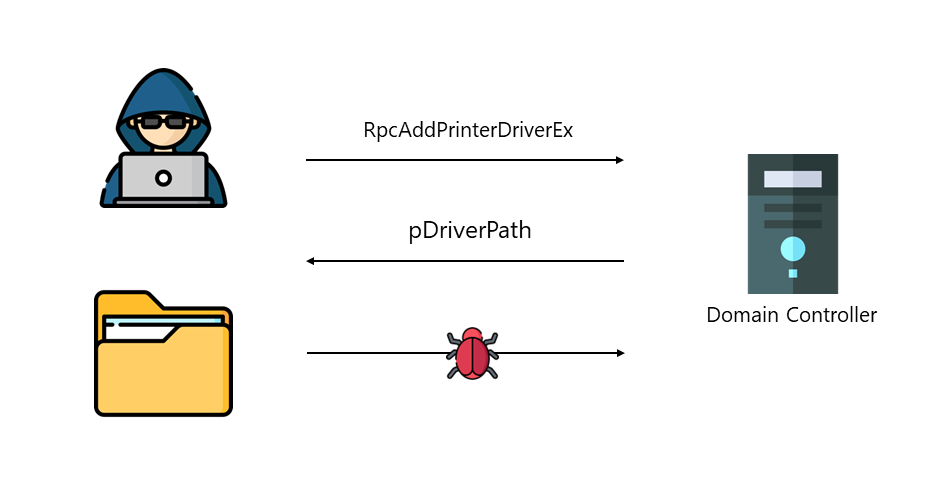
The second parameter for the function is “DRIVER_CONTAINER“. If we look at the structure of “DRIVER_CONTAINER,” we see it accepts levels. Looking at “DRIVER_INFO_2,” we see an exciting parameter named “pDriverPath.” If we set the path to a path we own, we can add a malicious driver that runs under the context of the print spooler, which is SYSTEM. To make it even worse, “RpcAddPrinterDriverEx” is a function that can be accessed remotely using a Remote Procedure Call, making it Remote Code Execution. Before Microsoft patched this vulnerability, any authenticated user could add drivers to any device running the printer spooler service, including Domain Controllers.

Image 1: Malicious driver upload to a Domain Controller

The “RpcAddPrinterDriverEx” function is just one of many examples of malicious actors abusing the print spooler service to compromise an environment. Microsoft, therefore, advises turning off the print spooler service on any device where the print spooler is not needed, especially the Domain Controller.

Disable Print spooler service on domain controllers

When you disable the print spooler on a Domain Controller, pruning published printers in Active Directory must be done manually. If a published printer is at the end of its life cycle, an Administrator must delete the printer in Active Directory. Although manually removing objects in Active Directory can be tedious, the risks with the print spooler overshadow the manual removal of objects.

You can use the PowerShell command to check for any published printer in Active Directory.

Get-AdObject -Filter "ObjectCategory -eq 'printqueue'"

If there is no result from the command above, there is no published printer in Active Directory, and the print spooler on all Domain Controllers can safely be disabled. Otherwise, administrators must manually remove the printers from Active Directory when turning off the print spooler on Domain Controllers.

For the Microsoft Defender for Identity recommendation, I recommend using a Group Policy Object on the Domain Controllers to turn off the print spooler on all Domain Controllers Organization Unit.

Image 2: Disabling the print spooler using a GPO

The best-recommended action is to turn off the print spooler service on all servers that do not need the print spooler.

Conclusion

Due to the many vulnerabilities in the print spooler, which result in a complete domain take-over if the service runs on a Domain Controller, turning off the print spooler is the best mitigation. Sure, manually removing printers from Active Directory is tedious, but this does not outweigh the security risks that come with the print spooler.